Single-Click Apps
Introduction
Single-click apps are an effective way to integrate your custom functionality with the BigCommerce control panel user interface, as well as seamlessly handle authentication and authorization. This methodology is also the most common way of making apps easily available and installable from the BigCommerce app marketplace.
Benefits of Single-Click Apps
With BigCommerce’s APIs and toolkits, it’s possible to build your own web application to integrate with your store using any tech stack and any user interface you choose.
This is exactly what single-click apps are - self-hosted web applications built with your preferred languages, tools, and frameworks. The key factors distinguishing single-click apps are that they are registered in the BigCommerce Developer Portal and implement endpoints to support a standard OAuth installation workflow.
The single-click app workflow automatically handles approval of an app’s required OAuth scopes and displays the web application’s user interface embedded with the BigCommerce control panel.
Single-click apps offer the following advantages over other app strategies:
- The standardized approach to authentication is cleaner and more secure than manually creating and managing API account tokens.
- The single-click authentication workflow is also particularly well suited for multi-tenant applications, easily facilitating installation on multiple stores.
- Since single-click apps are integrated into the BigCommerce control panel, admin users do not have to log into separate systems, and developers do not have to build custom authentication for the app itself.
- With the use of app extensions, single-click apps can integrate your custom functionality into the most relevant areas of the control panel, not through only a single entry point, making your features available exactly where users need them.
- The installation process easily facilitates an entry point for your application to perform needed one-time initialization tasks, such as installing scripts or doing an initial data sync, and perform them consistently on all stores the app connects to. By the same token, the uninstall process facilitates any BigCommerce data clean-up if the app is disconnected.
- Single-click apps are well equipped for the BigCommerce app marketplace.
Draft Apps
It’s important to note that single-click apps are not relevant only for applications intended for offering publicly in the marketplace.
The “Draft” status - referring to an app that has not been submitted for marketplace approval - is key to the initial app development process but can also be used to maintain entirely private apps intended only for a single store. Registered draft apps can be installed on any store owned by the same account that was used to register them.
The availability of private apps means that single-click apps can be used for any needed custom functionality for a store, not only for marketplace-bound features.
OAuth Workflow
When a single-click app is registered, the OAuth scopes it requires are defined. Then when the app is installed within a store’s control panel, an OAuth workflow allows the admin user to approve the required permissions and BigCommerce to generate a token for the app to use for REST API operations.
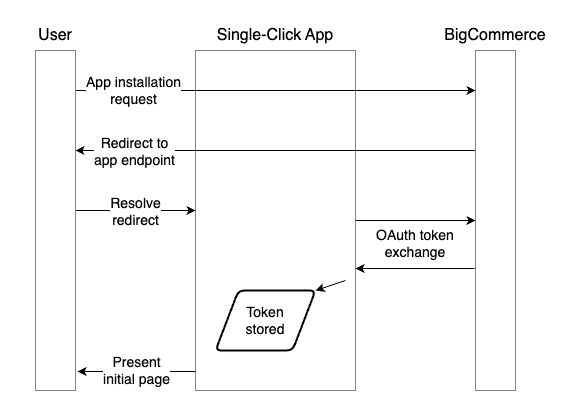
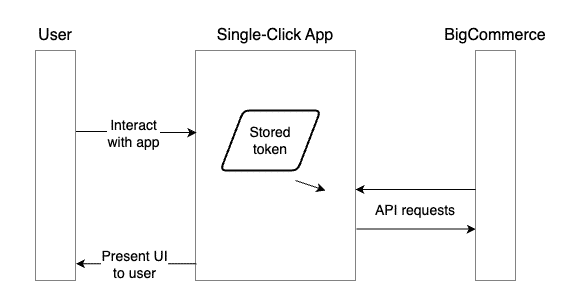
The web app is responsible for storing the OAuth token it receives during the installation process and retrieving it for any API operations. BigCommerce notifies specific endpoints in the app whenever a user loads it in the store control panel, sending information about the specific store and user. This also makes it easy for apps to manage granular user permissions if necessary.
Learn more about app development in the developer documentation.
BigDesign
While your single-click app’s user interface can be built using whatever tools and presentation you choose, a UI conforming to the rest of the BigCommerce control panel makes for the most intuitive and consistent experience for admin users.
BigDesign is a React component toolkit that enables easy adoption of standard BigCommerce UI elements and styles into your own applications. Learn more in the app design documentation.

