Example Scenarios
Introduction
Having explored the key aspects of the BigCommerce developer experience, let’s return to the topic of strategies for building within a SaaS model. It’s one thing to understand each individual tool, from APIs to webhooks to storefronts, but how do you put these pieces together?
There are myriad ways your apps, services, and API integration points might be orchestrated to meet your needs, but here we’ll look at some of the most common workflows.
Theming the Storefront
Our simplest scenario to visualize is applying your own unique brand, visual style, and format to your storefront UI.
Stencil
With a Stencil-based storefront, you’ll develop your UI and styles in a custom theme package that you then upload and apply to your store.
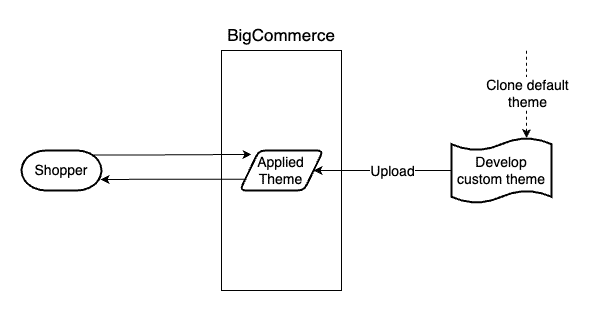
Note that in this style of storefront, the shopper interacts with the BigCommerce native platform, which serves pages based on your theme’s templates.
This theming scenario doesn’t involve any functionality requiring a custom back-end, so no hosting of your own applications or middleware is involved.
Composable
With Catalyst or your own composable storefront, theming customization is done directly in the storefront app.
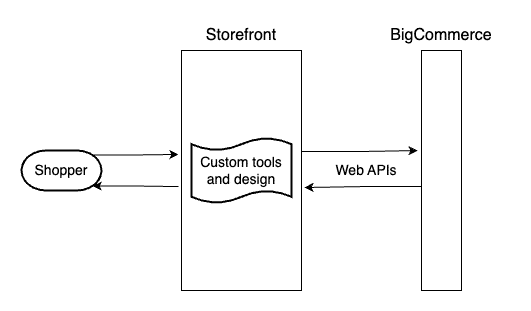
In contrast with Stencil, a shopper browsing to the storefront interacts directly with the storefront app, which interacts with BigCommerce via web APIs.
Custom Storefront Functionality
When your storefronts need custom functionality beyond simple theming, your own back-end apps or middleware come into play. How these are integrated into the front-end can differ between Stencil and composable front-ends.
Stencil
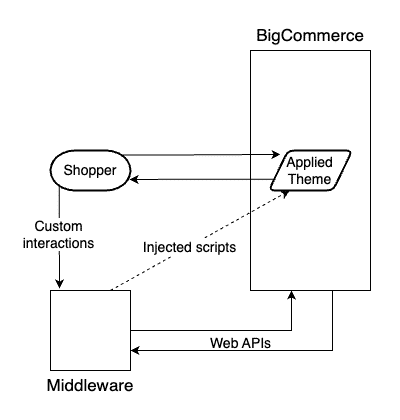
In this workflow, a self-hosted app provides custom functionality, interacting with BigCommerce via web APIs on the back-end. Client-side scripts are the key method for injecting appropriate event handlers or entry points in your Stencil theme to achieve the shopper’s interaction with the external app.
Composable
You have more flexibility for integrating custom functionality with a composable storefront. Such functionality can be developed directly in the server-side or client-side layer of the storefront app.
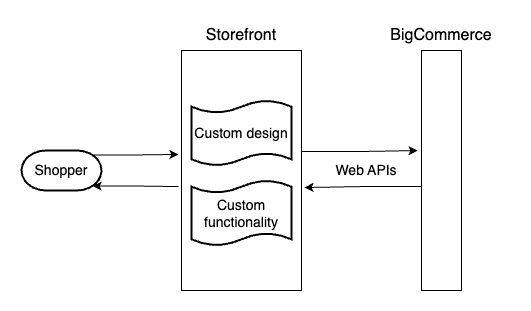
Or it may still make sense to encapsulate a functional requirement into a separate service.
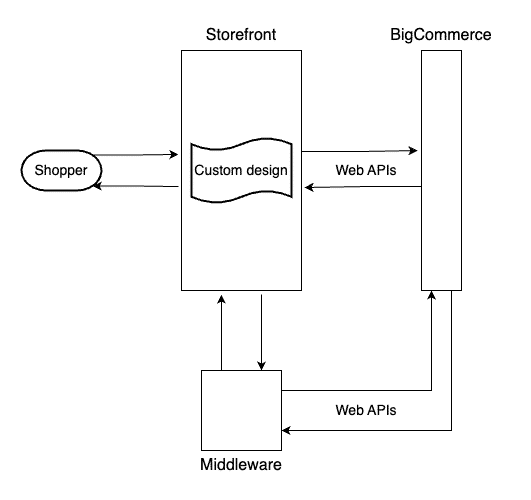
A Simple Back-end Integration
As a straightforward example of a back-end integration with BigCommerce, consider a scenario in which you need to regularly sync data from your store into third-party software such as an ERP, CRM, or PIM. Such an integration might not even need a UI.
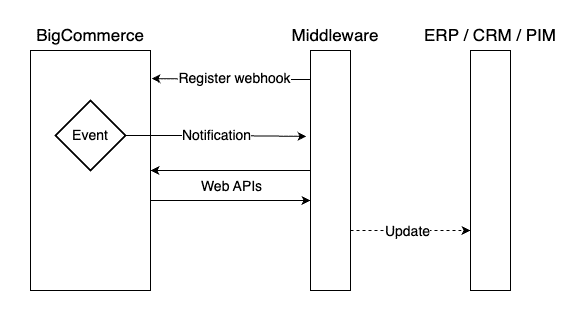
In this particular example flow, a self-hosted middleware registers a webhook with BigCommerce, receives a notification when data changes, uses web APIs to fetch additional details, and then updates the external records.
Custom Control Panel Functionality
We’ve already covered the details of how BigCommerce single-click apps facilitate custom functionality directly in the store control panel.
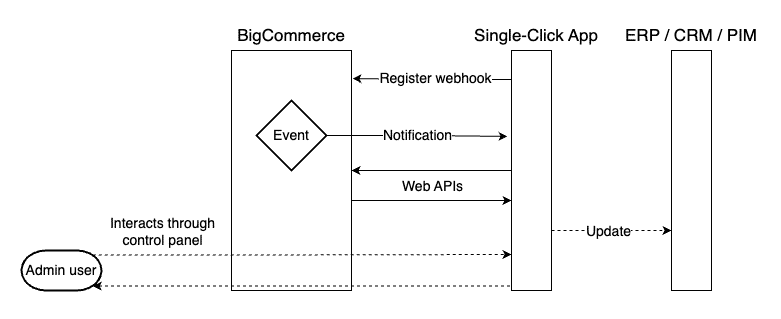
This particular workflow visualization demonstrates that a single-click app can utilize the same tools (such as webhooks) and provide the same functionality (such as syncing data to external software) as any self-hosted middleware, while also presenting a custom UI to an admin user via the control panel.

