Webhooks
Introduction
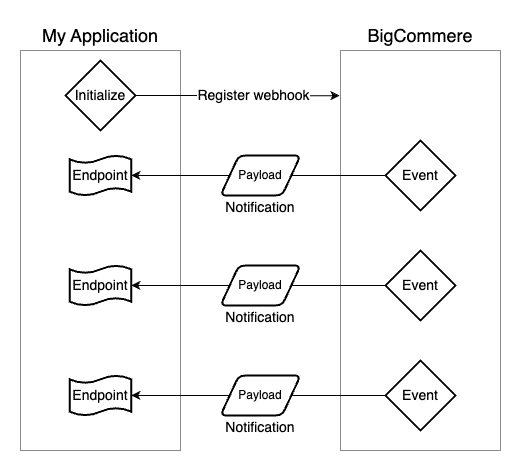
The main suite of web APIs supports a data flow strategy initiated by your own application connecting to BigCommerce. Webhooks can be thought of as supporting the opposite model, with BigCommerce initiating notifications to your application in response to important events in a store’s data.
Webhooks are an excellent strategy for syncing data from your store to an external system or initiating important actions when data changes. Consider the simple example of synchronizing BigCommerce orders into an external ERP. While it’s possible to make periodic requests via the REST API to check for new orders, this is an inefficient model likely resulting in many wasted API calls and a latency in between updates. Instead, webhooks can be used to ensure that BigCommerce notifies your application whenever a new order is created. This strategy makes webhooks a key part of your toolkit for many types of applications or integrations.
A webhook must first be registered for an available event on a specific store. From that point, when this event occurs in the store, BigCommerce will send a notification with a specific data payload to the registering application.
Registering Webhooks
A set of endpoints in the BigCommerce REST admin APIs support the management of webhooks. These follow the same URL pattern and the same authentication strategy as all REST admin APIs, relying on an OAuth account token supplied in the X-Auth-Token header.
Requests to create a webhook include two key pieces of information:
- scope: A string identifying the event the webhook will listen for, such as “store/order/created”
- destination: A fully qualified URL in your web app that will receive notifications for the event
When a webhook is created, the response body will include the above details, the store hash of the store the webhook was created for, and a unique ID. It’s best practice for your application to record these IDs, since they are required in requests to update or delete webhooks.
See the full documentation for the REST API endpoints pertaining to webhooks.
Available Webhook Events
A wide variety of events, or “scopes,” is available to register webhooks for. These include scopes pertaining to catalog entities like products and categories, inventory, metafields, carts, orders, shipments, store settings, and many other types of data.
These are a few examples of available webhook scopes:
- store/product/created: When a product is created
- store/product/metafield/updated: When a product metafield is updated
- store/channel/created: When a channel is created
- store/cart/couponApplied: When a coupon is applied to a cart
- store/channel/{channel_id}/cart/couponApplied: When a coupon is applied to a cart on a specific channel
- store/customer/address/updated: When a customer address is updated
- store/channel/{channel_id}/settings/profile/updated: When store profile details affecting a specific channel are updated
It’s also possible to create a single webhook to listen for all events pertaining to a specific entity type, using a scope formatted like “store/order/*”.
See the full documentation for available events.
Callback Payloads
When an event occurs, BigCommerce makes an HTTP request to the URL specified as the destination when a webhook was created. The callback’s request body contains a payload with relevant data for the event, which follow a standard pattern.
The following is an example payload for the “store/order/created” event:
- producer contains the hash of the store, while store id_contains its ID. These are particularly useful for multi-tenant applications that may receive webhook callbacks from multiple stores.
- hash contains a hash of the JSON-encoded payload, useful for identifying duplicate events, such as if the same properties of a specific product are updated multiple times in a short period.
- data contains the unique event data.
The data object in the payload commonly follows a pattern describing only the type of entity that triggered the event and the entity’s ID. However, this data often includes other details, and the payload of each event type can vary as appropriate.
Whatever details are included in the payload’s data, they serve the purpose of minimally identifying the event and the affected data. Your application can then, as necessary, utilize the appropriate web API to fetch additional details about the relevant entity and its current state.
Handling Callbacks
When receiving a webhook notification from BigCommerce, it’s very important to ensure that your applications properly acknowledge the notification was received by returning a HTTP 200 response.
If callbacks are not acknowledged with this response, BigCommerce will re-try, sending the same event notification again at intervals. If callbacks consistently fail to receive a proper response, this will result in the webhook being deactivated.
See the BigCommerce documentation for more details.

