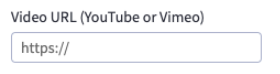
Regex Input

Allows you to display regex input controls for your widget. Regex setting can capture and provide conditional state to other schema settings.


Widget Configuration Output

{
"videoUrl": {
"value": "https://www.youtube.com/watch?v=-5EQIiabJvk",
"parts": {
"type":"youtube"
}
}

User Interface Output

output


JSON Schema

PropertyTypeDescriptionExample
typestringThe type of setting component to display.regexInput
labelstringThe user friendly message to inform the user how this setting will be used.”Video URL (YouTube or Vimeo)“
idstringThe variable name where the setting value will be available in the widget template.videoUrl
defaultstringThe default value to use when rendering the widget for the first time.""
typeMetaobjectAdditional information needed based on the selected setting type.
typeMeta.placeholderstringPlaceholder text in the text editor.”https://“
typeMeta.regExPatternsarray
typeMeta.regExPatterns[].patternstring”(vimeo
typeMeta.regExPatterns[].matchIndexinteger0
typeMeta.regExPatterns[].configKeystringtype