BigCommerce Data in Catalyst
Introduction
Catalyst naturally represents a concrete example of external data integrated into a Makeswift-powered frontend, as your BigCommerce store data is critical to the content presented to your visitors.
Let’s look more closely at how this data is accessed and handled within Catalyst.
Editable Dynamic Pages
You’ve already seen many of the details of the strategy used for editable dynamic pages, such as product detail pages, with the discussion of MakeswiftComponent.
The specialized route app/[locale]/(default)/product/[slug]/page.tsx is responsible for the rendering of a product page, and there is quite a lot more data fetching going on in this route than the loading of a Makeswift snapshot. (Specifically, a GraphQL query in app/[locale]/(default)/product/[slug]/page-data.ts fetches the product’s data from the catalog.)
Using a strategy involving a React context provider and a unique snapshot identifier for MakeswiftComponent, as we’ve previously explored, the BigCommerce product data is made available to various components, allowing them to render both data sourced directly from the catalog and Makeswift content unique to the product.
Catalog Components
In addition to the ability to edit dynamic pages in Makeswift, Catalyst also makes several catalog-aware components available in the editor. These are available under the “Catalog” group in the component drawer.
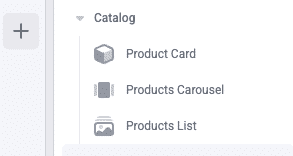
These components utilize BigCommerce catalog data within their prop controls and rendering logic. The Product Card, for example, can be used in any page in the editor and allows you to select a specific product from the catalog, with that product’s name, price, etc, being rendered in the component.
In this case, the product data in question is not tied to a specific dynamic page route. The component can be used anywhere, including on static pages, and the data fetching is handled by the component itself.
This is accomplished using two of the data integration techniques we’ve discussed, which you can see in action in lib/makeswift/components/product-card:
- The Combobox Control: The property interface presented to users in the Makeswift editor to select a product is of the Combobox type, allowing dynamic logic for the options presented. This control performs a fetch based on the user’s search term, returning a list of products from the catalog. The user’s selection ultimately determines a simple entityId stored in the component’s props configuration.
- API Routes: An API route defined in app/api/products/[entityId]/route.ts exposes the product search functionality used by the component. The component makes a client-side fetch to this endpoint, both within the Combobox control and in the final rendering on the page based on the saved entityId. The API route wraps server-side logic to make the appropriate GraphQL requests to BigCommerce to retrieve the product data.
Customer Group Slot
The “Customer Group Slot” component under the “Catalyst” group in the component drawer supports building content that is targeted at specific BigCommerce customer groups.
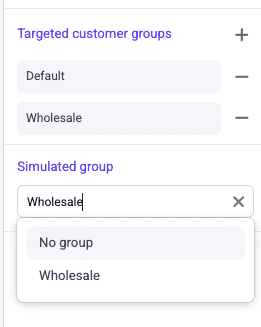
This is built with techniques similar to those used for the catalog components. With this component, a list of targeted groups can be configured, with a separate Slot control for each rendered in the builder. A convenient “Simulated group” property allows you to control which targeted customer group is currently being rendered and edited within the builder canvas.
REST Token Requirement
Note that this component requires fetching data about your store’s configured customer groups, which is not available to the GraphQL Storefront API that powers Catalyst. In order to make use of the component, you must configure a REST API account token in the BigCommerce store control panel.
The API account must have permissions for viewing customer groups, and the token should be set as the value for the Catalyst environment variable BIGCOMMERCE_ACCESS_TOKEN.
With this API token in place, the component can be configured in the builder.

