The Makeswift Approach to Components
Introduction
While understanding the basic Next.js architecture of Makeswift is valuable, your chief concern as a developer will be with creating custom components for the visual editor. With the ability to effectively express a variety of presentations and interactions as visual components, you can enable marketers to realize virtually any content experience they can imagine.
Makeswift Components Are React Components
The chief philosophy driving component development in Makeswift is that these building blocks are simply React components. The code required to build a component’s structure and rendering logic requires no concepts or techniques beyond those common to building any React-based interface.
In Catalyst, Makeswift-enabled components usually involve at least two files: One to define the component itself, and one to register the component with the Makeswift runtime.
The React component definition and logic contains no references to the Makeswift runtime or client, no specialized logic, no context related to Makeswift at all. Nothing in the component logic distinguishes it any way from any other component in any React application.
The registration file’s sole job is usually simply to connect the React component with the Makeswift runtime. In some cases, this registration file might “wrap” the lower level component in a separate component to provide some additional logic, but this is not required.
You can see a simple example in lib/makeswift/components/card/register.ts. The React component registered by this file (defined in client.tsx in the same directory) is a very slim wrapper around the “main” component, which doesn’t even reside within the makeswift/components directory. Rather, Card is a simple piece of UI from the Catalyst component library. The core definition of this component doesn’t differ at all from a non-Makeswift Catalyst installation. The small wrapper component found serves only to convert some props to be suitable for the more generic component.
This approach to components means that gaining mastery over React principles essentially gives you mastery over building in Makeswift, while also equipping you to develop effectively in any number of other React-based applications! If you have previous expertise in React, you are already primed to develop for the Makeswift builder.
Reference Forwarding
React reference forwarding is a technique that allows a component’s ancestor to obtain a direct reference to the rendered DOM (Document Object Model) element.
The above component “forwards” a reference that will be populated by the <ul> DOM element after rendering, allowing the component’s ancestor to operate on this element with JavaScript.
The React function useRef allows you to instantiate a piece of state that tracks an actual DOM element after rendering, which can then be used in JavaScript code. The “forwarding” technique used in the BlogList component above allows outside code to obtain its own reference to the rendered <ul>.
With this in place, BlogList can take care of its own implementation details, including what HTML structure is involved, while any code using that component can still obtain a reference to the “main” DOM element representing the component:
Reference forwarding is often used in components to identify the correct root element for the Makeswift runtime. It’s good practice to implement forwardRef in your own components, passing the received ref to the top-level HTML container element.
Props and Controls
Props are a fundamental concept in React, allowing components to pass data down to their children and intelligently re-render them if this data changes.
The above component expects data in the form of props to be passed in when it is rendered. The component itself is completely agnostic in regard to where the prop data comes from or how it is passed. You can observe that this component in turn passes a sub-set of the props it received to BlogItem, which will likewise receive and use the prop without concern for how the data was provided.
Making a component usable and configurable in the Makeswift editor interface involves providing a connective layer that defines controls for the various aspects of the component that are editable in the builder and how they correspond with the props it expects.
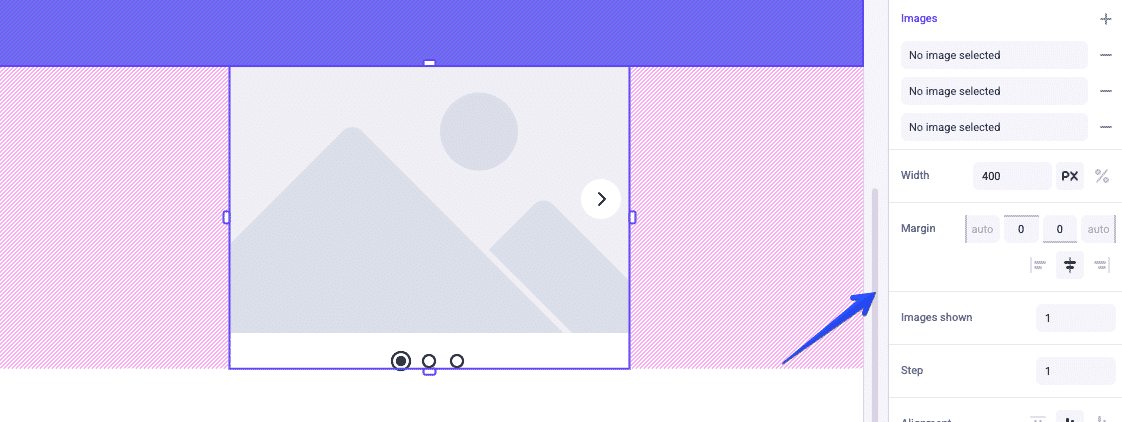
Controls define how properties are presented in the editor (via text fields, drop-downs, etc). The configured values are passed to the component as props with generic data types.
Everything editable about a component - not only simple fields but also rich text blocks and slots for nested components - is expressed as a control paired with a prop!
Component Registration
Examine the .register.ts file for any of the example components in lib/makeswift/components, and you’ll see that this code is responsible for registering the component with the Makeswift runtime, including the definition of the controls corresponding with its props:
Remember that these registration files are imported in lib/makeswift/components.ts.
Note in the above examples that there is a forward slash in the label: “Basic / Accordions”. Using this syntax will result in a grouping or “folder” structure in the components list in the editor. In this case, “Accordions” will appear under a “Basic” grouping along with any other components whose labels begin with “Basic / …”

