App Extensions: Guide
This guide describes how to get started developing App Extensions. It contains the following:
- An App Extensions-flavored variation on setting up a draft app
- Example requests and responses for the App Extensions mutations and query
- Implementation and code examples
Prerequisites
Before getting started working with App Extensions, make sure you have the following:
- A BigCommerce store; we recommend using a sandbox store or other non-production store.
- A Developer Portal account registered to the same email account that owns the sandbox store.
- General familiarity with developing BigCommerce apps. To familiarize yourself, see the Apps Guide or Apps Quick Start.
OAuth scopes
Use an app-level API account to make App Extensions API calls. Neither store-level nor account-level API accounts can manage App Extensions.
The following section describes the process for creating an app profile and app-level API account. Configure the following OAuth scopes as directed in Setup:
Setup
Unlike store-level API accounts, you can edit an app-level API account’s list of authorized scopes during development.
Create an app profile
Generate an app-level API account by creating an app profile in a Developer Portal account registered to the same email account that owns the development store.
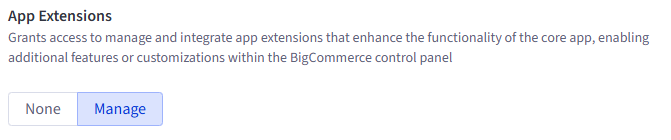
Add the required OAuth scopes from the preceding section on the Scopes tab of the app editor, then click Update & Close.
For more information on creating app profiles, see Managing Apps in the Developer Portal.
The following image shows the App Extensions : manage scope on the Scopes tab of the Developer Portal’s app editor:
Create a draft app
You can fork our Next.js starter app to get started quickly.
After you clone the starter app repository, start the development server and serve the draft app over https using ngrok.
For more information on persisting ngrok tunnels longer, see ngrok configuration.
For more information on working with draft apps, see the Apps Quick Start or Apps Guide.
Edit the draft app’s environment variables
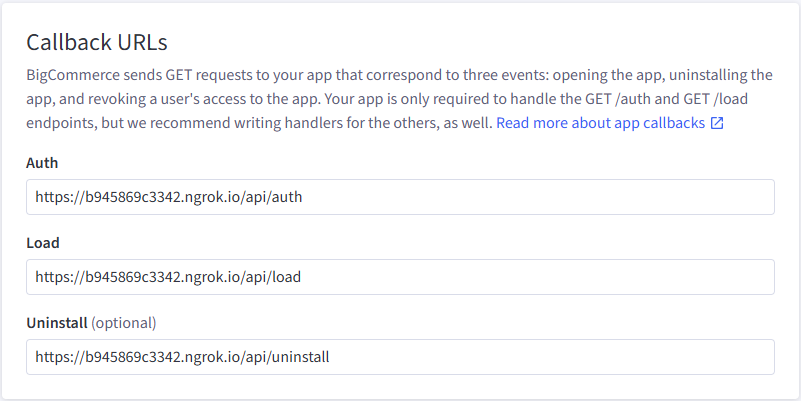
Copy .env-sample and rename it .env. Add the app profile’s client ID and client secret. Select a database type and enter your connection credentials. Configure the app callback URLs by replacing the domain name segment of the pre-populated auth callback URL with the ngrok instance’s domain name. For more on configuring additional environment variables, see the starter app README and .env-sample.
For more information on working with app environment variables, see the Apps Quick Start.
Seed the database
Use the starter app’s db:setup script, then restart the development server.
Example requests
This section contains examples of App Extensions-related GraphQL Admin API queries and mutations. It presents mutations and their variables separately. You can use a tool like Postman or Altair to make requests; if you prefer to get started quickly in Postman, see the App Extensions Postman collection.
Use the following HTTP configuration to send requests:
The following examples direct you to stringify the GraphQL query portion of your requests, but how this works in practice varies depending on the client you use.
Create an App Extension
The createAppExtension mutation registers an App Extension that opens a side panel on the store control panel’s customers page to let users read and write notes about interactions with specific customers.
Mutation
Variables
Request and Response
Get a store’s App Extensions
The Store appExtensions query returns a list of the store’s App Extensions registered to the API account that makes the request, along with any details requested using the query schema. Note that all GraphQL requests use the POST method.
Query
Request and Response
Update an App Extension
The updateAppExtension mutation can update the label object and the url of an existing App Extension. All other properties are non-mutable.
Changes to the label object overwrite existing values, rather than upserting. Be sure to send the full label object you intend the App Extension to have.
Note that the UpdateAppExtensionInput has two properties, id and data. Add the desired new values for the url or label properties to the data attribute.
Mutation
Variables
Request and Response
Delete an App Extension
The deleteAppExtension mutation deletes an App Extension. It cannot be recovered. Note that you can request an additional property that isn’t accessible to the other queries and mutations, deletedAppExtensionId. You can’t request any other properties in the delete mutation.
Mutation
Variables
Request and Response
Example code
Starter app
The BigCommerce Next.js starter app (GitHub) contains a branch that features a working, end-to-end App Extensions reference implementation.
Code sample
The following Node.js code sample uses the node-fetch http request package to create a color picker App Extension that opens in a side panel on the View Products page of the merchant’s store control panel.

