Overview
Overview
Checkout Extensions (Beta)
Beta access
This API is currently in beta. Checkout extension is available without restrictions in development and on a live store. We may introduce breaking changes without notice.
This release allows developers to add custom content or UI functionality in the shipping step and order summary area on the checkout page.
Introduction
BigCommerce has had tremendous flexibility in our checkout, thanks to being one of the only SaaS providers who has fully open-sourced our checkout frontend code to allow for unprecedented customization for a SaaS platform.
However, we know that many use cases for customizing the checkout are essentially “modular”, meaning you can think of them as additive improvements to usually just a single checkout step. We’ve heard it’s sometimes painful to build a fully custom checkout to implement a slight improvement, so we created a capability to empower merchants to build a checkout extension.
With an extension, merchants can customize BigCommerce’s Optimized One Page Checkout by extending a step of the checkout page. They do this upgrade safely as their checkout automatically receives updates, and all customization features will work. The critical takeaway for merchants is that they can enjoy enhanced customization without building a custom checkout and needing to opt-out from BigCommerce’s managed checkout.
Components
Checkout extension consists of the following main components:
- Checkout extension regions: Areas where web developers can insert an iframe on a checkout page.
- Checkout iframe: An embedded iframe allows developers to seamlessly integrate and display custom content within a checkout extension region while performing predefined activities.
- Checkout command: A specific string originating from an extension designed to trigger predefined actions within Checkout JS.
- Checkout query: A specific string originating from an extension designed to obtain data from Checkout JS.
- Checkout event: An event that occurs within checkout that you can broadcast to subscribed extensions to receive such events.
- Checkout extension API: A management API that developers use to register the extension.
- Checkout extension client library: This library allows you to initialize the extension. Using Checkout SDK is the only way to access the extension client library.
Architecture
The extension is a web app hosted outside of BigCommerce, that’s accessible with a URL or packaged as an offering available on the BC app marketplace. The following diagram shows the relationship between Checkout SDK, Checkout JS, and the Extension app. The Extension app is the actual extension implementation.
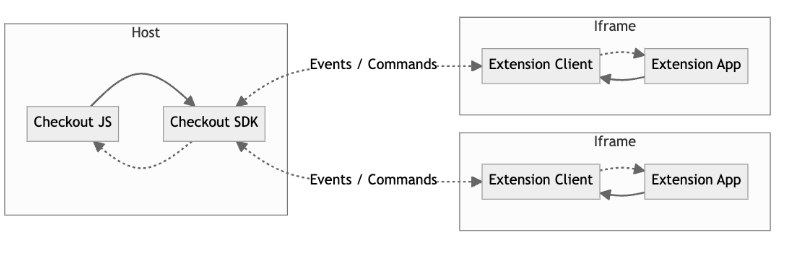
Communication mechanism The extension displays inside the checkout iframe on BigCommerce’s Optimized One Page Checkout (Checkout JS). As a cross-origin iframe, an extension and the checkout cannot access and execute scripts from one another directly. When the extension (iframe) loads, it attempts to establish a communication channel and waits for a confirmation from the checkout side.
Event-based communication
The majority of communication from the checkout to the extension is event-driven. The checkout uses the ExtensionEventBroadcaster within the Checkout SDK to broadcast checkout events to the extensions.
Command-based communication The extension client library allows extension apps to communicate with the host (checkout) by sending commands, which enables extensions to perform actions from the checkout.
Query-based communication The extension client library can obtain data from the host immediately by sending queries.
Developers can use client library functions like post() and addListener() to enable communication between the extension and the checkout.
An extension can only listen to events and send commands to make the changes we allow, preventing them from introducing any security vulnerabilities into the checkout page.
Limitations
-
A store must use BigCommerce’s native Optimized One Page Checkout.
(To use a custom checkout, it must include checkout extension features. Therefore, we don’t recommend using custom checkouts because they may be incompatible with extensions.) -
Events are limited to receiving new and previous consignment data when a change event happens.
-
Commands and queries are limited to those explicitly documented.
-
Extension placements are restricted to specific predefined regions.
Usage guide
To get you started, we’ve created a sample checkout extension app. This section provides information on how to initialize and register an app.
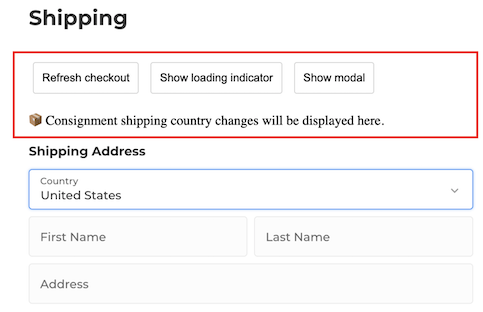
You’ll need to host the app on a CDN of your choice and register it using our Checkout Extensions API. It will then load on the checkout as follows:
Initialization
This section provides information on how to initialize and interact with the app. You can find the source code on GitHub at BigCommerce Checkout Extension Example.
To start using the extension, you must always initialize it using the extension client library. The primary initialization method is initializeExtensionService. You can call it with four parameters:
- extensionId
- parentOrigin
- taggedElementId
- fixedHeight
Events, commands and queries
The following events, commands and queries are available:
- Sending command to the checkout
Following the extension’s initialization, you will obtain an object containing essential helper methods. This object is known as extensionService throughout this documentation.
To send a command from the extension to the checkout page, use the extensionService.post() method.
- Reloading checkout data command
One common command is to request reloading the checkout data on the page. The checkout page will load the most recent checkout data when it receives this command. You can use the following code to send a reload checkout data command:
ExtensionCommandType.ReloadCheckout is an enumerated value imported from @bigcommerce/checkout-sdk.
- Showing loading indicator command
You can instruct the checkout page to display or hide a loading spinner, which is very handy when your extension executes a lengthy operation, and you want to provide visual feedback.
The code snippet above shows sending the ShowLoadingIndicator command with the payload indicating whether to show true or hide false the loading indicator.
- Modifying extension iFrame style command
You can change the appearance of your extension’s iframe, such as bringing it out to the middle of the page. The checkout page will use JavaScript’s Object.assign() method to apply the provided style settings.
To maintain the desired checkout flow, reset the style when your customization is no longer required.
- Force re-rendering shipping step command
You can force the checkout page to re-render the shipping step by sending the ForceRerenderShippingStep command. This reloads checkout data and re-renders the shipping step using the latest data. It may result in switching between single-shipping and multi-shipping modes.
- Retrieving the current consignments
You can retrieve the current consignments data from the checkout page instantly.
When you invoke this helper method, it sends a query to the checkout page and returns the response to the extension.
- Listening to checkout events
The extensionService.addListener() method provides a mechanism to listen to events that occur on the checkout side. This method allows your extension to react to changes and updates within the checkout process.
- Consignment changed event
This event is triggered when you change a consignment and save it to the server. It is beneficial for scenarios where you need notification of changes in shipping details.
You must create an event handler to process the event data to listen to this event.
The data.payload object passed to your event handler contains the new and previous consignment objects. You can access them using data.payload.consignments and data.payload.previousConsignments respectively.
Registration
When you deploy an extension to a BigCommerce store, you must register it with the Checkout Extensions management API. Once registered, your extension will display as you specified on the checkout. When the checkout loads, we query these registered extensions and display them. A checkout has multiple extension regions, allowing multiple extensions to load and work simultaneously.
To register your extension, you need to make a POST request to the following endpoint and include a payload like the one shown below:
- “name”: Provide a name for your extension.
- “region”: Specify the placement of your extension within the checkout process.
- “url”: Enter the URL of the hosted extension app.
- “description”: Include a brief introduction to your extension.
- “enabled”: Set to
trueto enable your extension.
Regions
The available checkout extension regions are:
- shipping.shippingAddressForm.before - before the shipping address fields
- shipping.shippingAddressForm.after - after the shipping address fields
- shipping.selectedShippingMethod - directly below the selected shipping method
- payment.paymentMethodList.before - above the payment method list
- summary.after - below the order summary
- summary.lastItem.after - after the last item in the order summary
Note that you can only assign one extension to a specific region.
FAQs
Are custom checkouts supported? No, custom checkouts are not supported. Custom checkouts often use an outdated version of the Checkout SDK and are, by nature, already heavily customized.
Will the checkout with an extension installed be PCI compliant? As long as your store uses the native Optimized One Page Checkout, BigCommerce carries the responsibility for maintaining PCI compliance of the checkout.
Can you support additional use cases that extend other areas of the checkout? Yes, let us know your use case for a checkout extension. We’re open to expanding on the events, commands, queries and regions of the checkout to support additional use cases such as:
- Exposing messages and essential information to shoppers directly inside the checkout flow.
- Letting shoppers adjust their carts directly within the checkout without returning to the cart page. This modification might include adding or removing items, adjusting quantities, and changing options.
- Enticing shoppers to add products to their order to receive free shipping (i.e., checkout upselling) and increase average order value.
Do you have an example of a checkout extension in Production? Yes, our partner Route has created a checkout extension to extend the shipping step on the checkout page to include package protection as an option.
How do I provide feedback or report issues? Let us know your feedback or report any issues for us to address using this form.
Can I test a checkout extension on my local development environment while running the Stencil theme on localhost using CLI? No, it is currently not available. Local development environment support is planned for the future. However, you can effectively perform testing and development right now using our sandbox store environment. This provides a functional alternative in the meantime as a local setup is not a strict requirement.

