Element Settings

Element settings are a way of grouping together settings intended to modify one element of a widget, complete with the option to show or hide the element.

The controls attribute can contain the following optional objects:

AttributeDescription
visibilityDisplays an eyeball icon similar to the Visibility setting type
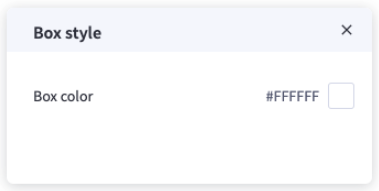
advancedDisplays a brush icon that reveals a list of settings when clicked

Widget Configuration Output

"textBox": {
"visibility": "show",
"backgroundColor": "#FFFFFF"
}

User Interface Output

output

output


JSON Schema

PropertyTypeDescriptionExample
typestringThe type of setting component to display.”element”
labelstringThe user friendly message to inform the user how this setting will be used.”Box”
idstringThe variable name where the setting value will be available in the widget template.”textBox”
typeMetaobjectAdditional information needed based on the selected setting type.
typeMeta.controlsobjectContains the visibility and advanced attributes.
typeMeta.controls.visibilityobjectDisplays an eyeball icon that toggles widget visibility.
typeMeta.controls.visibility.defaultstringThe default value to use when rendering the widget for the first time.”show”
typeMeta.controls.advancedobjectContains a list of settings that are displayed when the user clicks the brush icon.
typeMeta.controls.advanced.labelstringThe user friendly message to inform the user how this setting will be used.”Box style”
typeMeta.controls.advanced.settingsarrayInclude additional settings
typeMeta.controls.advanced.settings[].typestringThe type of setting component to display.”color”
typeMeta.controls.advanced.settings[].labelstringThe user friendly message to inform the user how this setting will be used.”Box color”
typeMeta.controls.advanced.settings[].idstringThe variable name where the setting value will be available in the widget template.”backgroundColor”
typeMeta.controls.advanced.settings[].defaultstringThe default value to use when rendering the widget for the first time.”#FFFFFF”