Structure and Conventions
Introduction
In this lesson, we will explore the file structure and conventions of the Catalyst storefront you spun up in the previous lab. We will examine key directories and files, gaining an understanding of how they contribute to the storefront’s functionality, from templates and assets to configuration and code modules. This overview will provide a solid foundation for navigating your Catalyst project and preparing for more advanced customizations.
Catalyst Directories
Let’s take a tour of the major files and directories in the Catalyst codebase.
- app — contains routes that correspond with a URL path/pattern. For example, the file app/[locale]/(default)/product/[slug]/page.tsx is the Product Detail Page
- client — contains the implementation of the GraphQL API client
- components — contains various visual components specific to Catalyst
- i18n — is related to localization
- lib — contains various utilities or libraries
- messages — contains translations
- middlewares — contains a few Next.js middlewares for things like localization and routing
- vibes/soul — contains the core library of UI components used to build the storefront experience
Routing
Routing in a web application is the process that resolves a particular URL path to a rendered page. Catalyst has a pre-built, opinionated routing scheme for all major storefront page types.
BigCommerce products, categories, brands, and web pages each have a URL path value.
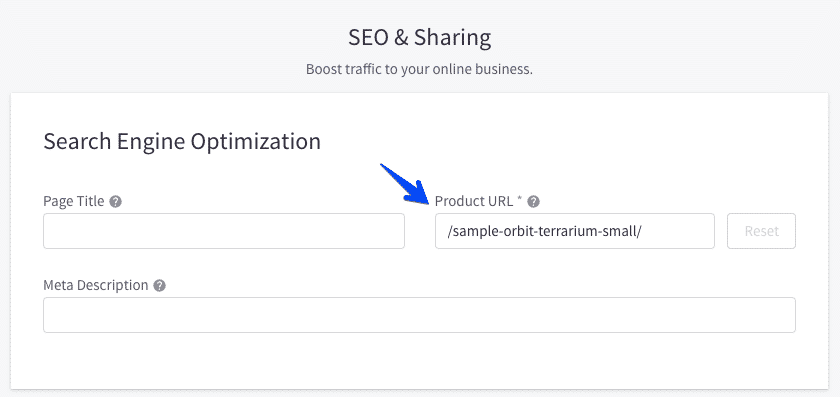
These paths can be generated with various patterns, according to your preferences as set in Settings > General > URL Structure. Catalyst’s routing architecture ensures that URLs in the storefront correspond exactly with these paths. A product with the above URL path value of /sample-orbit-terrarium-small/ will be found at the absolute path mystore.com/sample-orbit-terrarium-small/ on a Catalyst storefront.
Custom URL Middleware
Next.js Middleware can intercept requests before they reach a specific route, modifying or redirecting them. The central middleware entry point - middleware.ts- loads and executes multiple middleware functions, but the most important to familiarize yourself with is the middleware related to custom URLs.
Take this URL for example:
mystore.com/sample-orbit-terrarium-small/
URLs like the example above contain nothing to identify whether they correspond with a product, category, brand or web page. They do not correspond directly to the Next.js routing conventions expressed in the filepath of a page route like app/[locale]/(default)/product/[slug]/page.tsx.
Catalyst utilizes middleware to intercept such requests and determine their final routing.
middlewares/with-routes.ts contains the logic dedicated to this re-routing, which makes an initial GraphQL request to retrieve the type and ID of whatever entity matches the route. This info is then used to “rewrite” the request URL path, such that Next.js understands the path to be something like /product/123 and directs the request to the final matching route.
KV Storage and Vercel Runtime Cache
To optimize the process involved in determining a dynamic URL path’s final routing, Catalyst employs a key-value (KV) store, or the Vercel Runtime Cache API to cache the results of these route and store status GraphQL requests. In local development environments, the implementation used for this store is a simple JavaScript Map that is not persistent. In deployed environments, however, a true storage implementation is expected.
This means that, in practice, only a small fraction of page renders will ever need to make the GraphQL requests for store status and the route information for a particular path.
For builds hosted on Vercel, the use of the Vercel Runtime Cache will be automatic, with no specific configuration required. For other hosting, Catalyst has built-in support for Upstash for Redis, which must be set up and configured in your hosting environment. It’s simple to implement your own adapter in lib/kv for other KV store implementations.
React
React is a Javascript-powered library for rapidly and easily building user interfaces, and React components are central to the visual design system in Catalyst.
Compared with a templating language like Handlebars in Stencil, React components offer similar capabilities for expressing dynamic data but also encompass much more. React interfaces are a tree of modular components, which are actually JavaScript functions encapsulating both the logic and presentational markup relevant to a specific piece of UI.
React is a large topic, and its full capabilities are beyond the scope of this course. If you’re new to the technology, see the official guide to start. The following are some of the basic concepts.
Functions and JSX
React components are functions that return JSX code - an HTML-like markup that allows mixing in JavaScript expressions.
JavaScript Expressions
Wherever braces appear within JSX, the code within them is a JavaScript expression. This is essential for working with dynamic data.
Referencing dynamic values, conditional output, loops, and similar constructs require no specialized syntax. Familiar JavaScript syntax like object notation, comparison operators, and array functions are used for these tasks.
State
State values provide the “memory” of a React component, tracking data that changes in response to user interaction or external systems.
State is key to creating highly dynamic UI, making it easy to incorporate even very complex combinations of states by simply describing conditional output with JSX.
An Example
The following example demonstrates a straightforward implementation of the concepts we’ve described.

