Admin APIs
Introduction
Admin APIs support nearly any type of integration between your own software and BigCommerce. These APIs facilitate not just fetching data but also adding or mutating it, or otherwise initiating admin-level actions within BigCommerce.
Admin APIs can serve the following use cases and many more.
Back-end Integrations
Use the admin APIs to consume data from a Product Information Management (PIM) platform to build your BigCommerce catalog, pull online orders into an Order Management System (OMS), sync customer data with Customer Relationship Management (CRM) software, or any number of other integration use cases.
Custom Admin Functionality
Admin APIs are a key component of enhanced functionality for admin users, whether in BigCommerce Single-Click Apps or your own custom-built applications. This could include dashboards for integrations with other systems, enhanced customer management, custom merchandizing functionality, etc.
Building Storefronts
While the Storefront APIs will be your go-to tools for interacting with BigCommerce data from your storefronts, your unique use case might involve certain actions available only in admin APIs. For example, certain shopper actions might involve adding a product with custom pricing to the cart, or you might be implementing your own custom checkout complete with payment processing. As long as authentication is handled securely and critical actions aren’t taken with untrusted data, this is a legitimate use case for admin APIs in your storefront applications.
Front-end Integrations
Beyond using APIs directly within your storefront application, independent side apps might support the full front-end experience for your users. For example, you might require an application to implement a single sign-on flow that creates customers in BigCommerce based on front-end initiated actions. This is the appropriate model for admin-related functionality integrated into a Stencil storefront and may be well suited to your composable storefront as well.
Because of their scope, admin APIs involve credentials authorized directly by admin users and typically involve assigning specific permissions to these credentials.
REST Admin APIs
-
BigCommerce REST APIs give you broad management capabilities across the platform and are grouped into several major categories:
-
Catalog API- Manages products, categories, and brands
-
Content API- Manages data such as Stencil themes, widgets, web page and blog content, and email templates
-
Management API- Manages a diverse array of other BigCommerce entities, from channels to customers to orders to promotions
-
Storefront Token Management- Generates authentication tokens for the GraphQL Storefront API
-
Webhooks- Registers and manages webhooks
Authentication
All API requests falling into this category are authenticated using an OAuth account token. Valid OAuth tokens are provisioned in one of two ways.
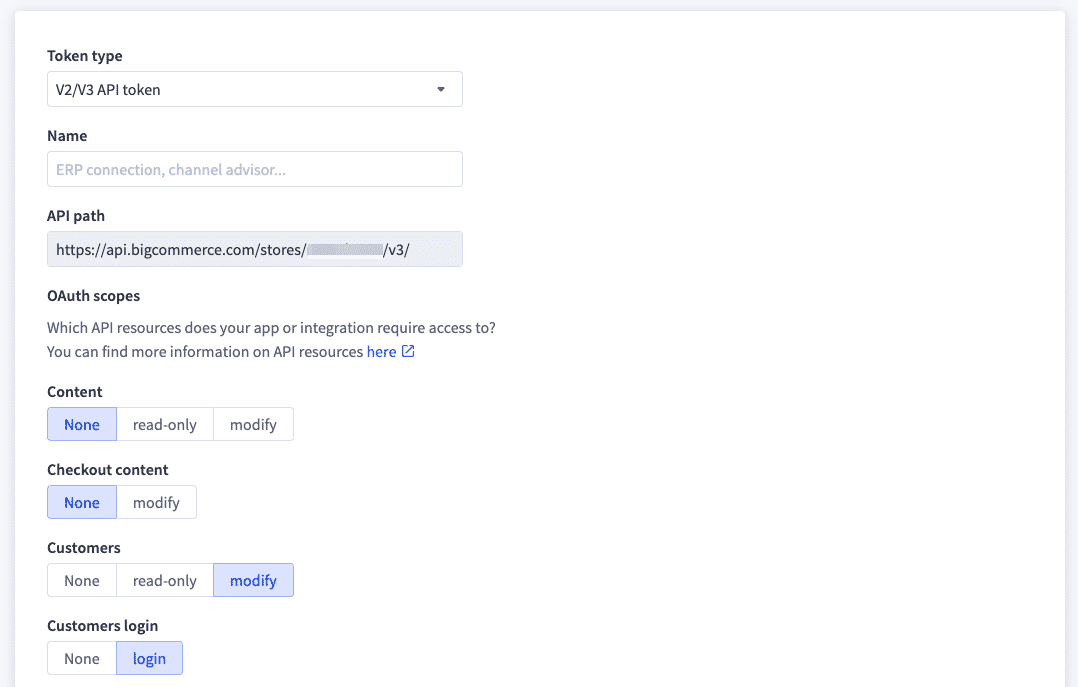
Store-level API accounts can be created manually within the BigCommerce control panel, where specific OAuth scopes are set. Each API account is associated with a token for use in API requests, as well as a client ID and secret.
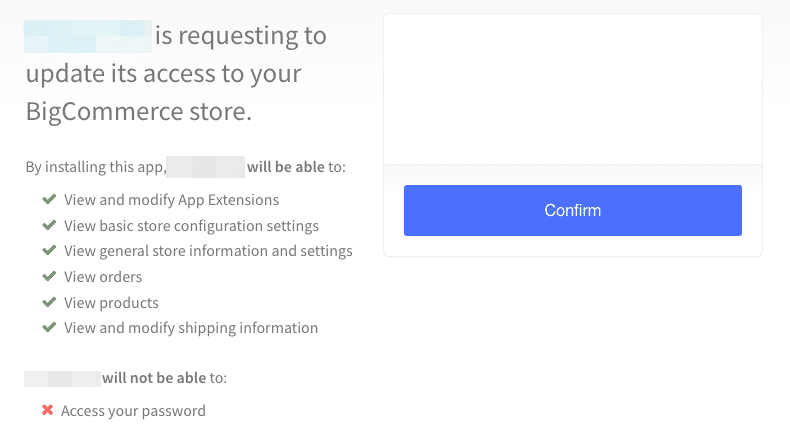
Single-Click Apps have their own unique OAuth client ID and secret, and a specific set of required scopes. Admin users approve these scopes when they install an app in their store control panel, which generates a unique token for the app to use with that store.
The OAuth token is provided in the X-Auth-Token header.
Example Request:
Payments API
The Payments API is available for directly processing customer payments using credit card details or via other payment instruments. Use this API if you need to build a custom storefront checkout or to process payments from a different entry point.
Authentication
Payments API endpoints use the same OAuth tokens described above in REST Admin APIs. In addition, the endpoint for actually processing a payment exists on the separate payments.bigcommerce.com domain and also requires a single-use Payment Access Token generated for a specific order.
Example Request:
GraphQL Admin API
The GraphQL Admin API is similar in concept to REST admin APIs but handles different domains of operations. The capabilities of this API include actions like:
- Registering App Extensions for Single-Click Apps
- Enabling the Big Open Data Layer for sending storefront data to third-party analytics providers
- Setting global and locale-specific product information
Authentication
The GraphQL Admin API endpoint uses the same OAuth tokens described above in REST Admin APIs.
Example Request:
B2B REST Management API
The B2B REST Management API offers capabilities for querying and managing all manner of data related to BigCommerce B2B Edition, such as companies and invoices. Use this API within your integrations and front-end implementations to perform tasks like:
- Creating B2B companies and managing their users and addresses
- Creating and fetching invoices
- Updating customer quotes and generating checkout URLs from them
- Managing sales staff users and the companies they have access to
Authentication
API account tokens can be generated by B2B Edition admin users via the control panel or the API itself.
The B2B Edition control panel supports creating an API account and obtaining a token.
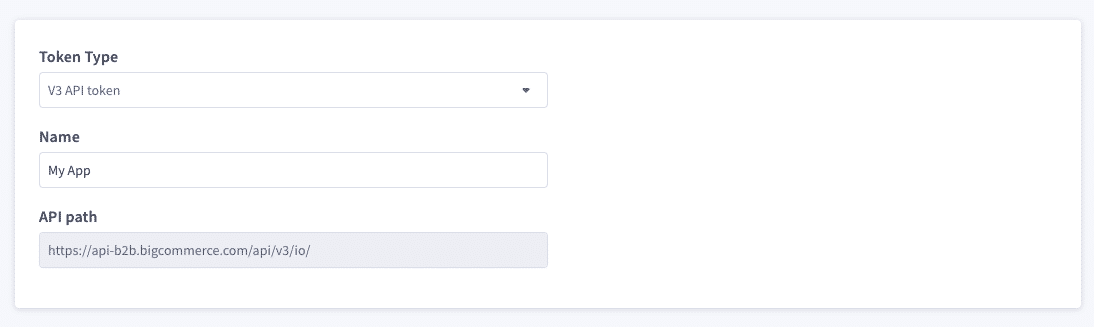
The Server to Server Token API endpoint can also be used with the email/password of an admin user to obtain the same kind of token.
The authorization token is passed in the authToken header.
Example Request:

