Payments API
What is Payments API?
The Payments API enables you to process payments through the store’s connected payment gateway. Merchants can receive a payment for an order that was created using either the Store Management Checkouts API endpoint or the Orders API.
Why is it important?
The API extends the Checkout API by finalizing orders with a payment. With the Payments API, it is possible to completely process an order from cart to purchase on an external application.
PCI Compliance
- BigCommerce is only responsible for the security of credit card to the extent that it is directly in the route of the payment request to payment processors during a payment processing request. To ensure secure handling of payment instruments, as a third-party developer, you are responsible for developing the storefronts or recurring billing apps in a PCI compliant manner and maintaining a PCI compliance certification for third-party service providers certified by an external Qualified Security Assessor (QSA).
- Merchants’ and shoppers’ personally identifiable information (PII) collected by recurring billing apps that consumes the BigCommerce Payments API must have it’s own Privacy Policy sufficient to the requirements of the European Union General Data Protection Requirements (GDPR) which must be available and displayed to the general public.
Processing a payment
- Create the payment token:
https://api.bigcommerce.com/stores/{{store_hash}}/v3/payments/access_tokens - Process the payment:
https://payments.bigcommerce.com/stores/{{store_hash}}/payments
You can process payments charged to either of the following two main forms of payment
- Stored payment instruments
- New cards which weren’t previously saved
The API flow does not currently support hosted, offsite, or wallet-type providers such as Amazon Pay.
Stored Credit Cards and PayPal Accounts
There are three steps to using a stored card to make a payment.
- Get Payment Methods
- Create Access Token
- Process Payment
To use stored cards with the Payments API or the Checkout SDK make sure both the payment gateway and the store are compatible.
The payment gateway and store are compatible if the following apply:
- The payment gateway supports making charges to stored payment instruments. See the BigCommerce Developer Documentation for a list of compatible payment gateways
- The store is on a BigCommerce Plus plan or higher, uses optimized one-page checkout and the stored credit cards setting has been enabled in the control panel
Follow the steps below to enable the stored cards setting in the control panel:
- Navigate to Settings
- Click Payments under the Setup section
- Click the Braintree Settings tab at the top of the page
- Scroll down to the Stored Credit Cards section
- Check the box next to “Enable stored credit cards with Braintree”
- Click Save
For more information on enabling stored cards, see Enabling Stored Credit Cards.
Credit Cards
There are two steps to using a credit card to make a payment.
- Create Access Token
- Process Payment
The payment gateway your application uses must be able to send raw card data through our API. Before beginning development, verify that your gateway is listed as a compatible payment gateway or select one that is.
Attempting to process a payment through the API using the full credit card information may fail if the card issuer requires 3DS authentication. In that case, the card must be saved through a shopper-initiated transaction before it can be charged using the Payments API.
Get Payment Methods
A GET request to /payments/methods returns a list of accepted payment methods based on the order_id.
Required Fields
order_id
Example:
Use to get the token for stored cards.
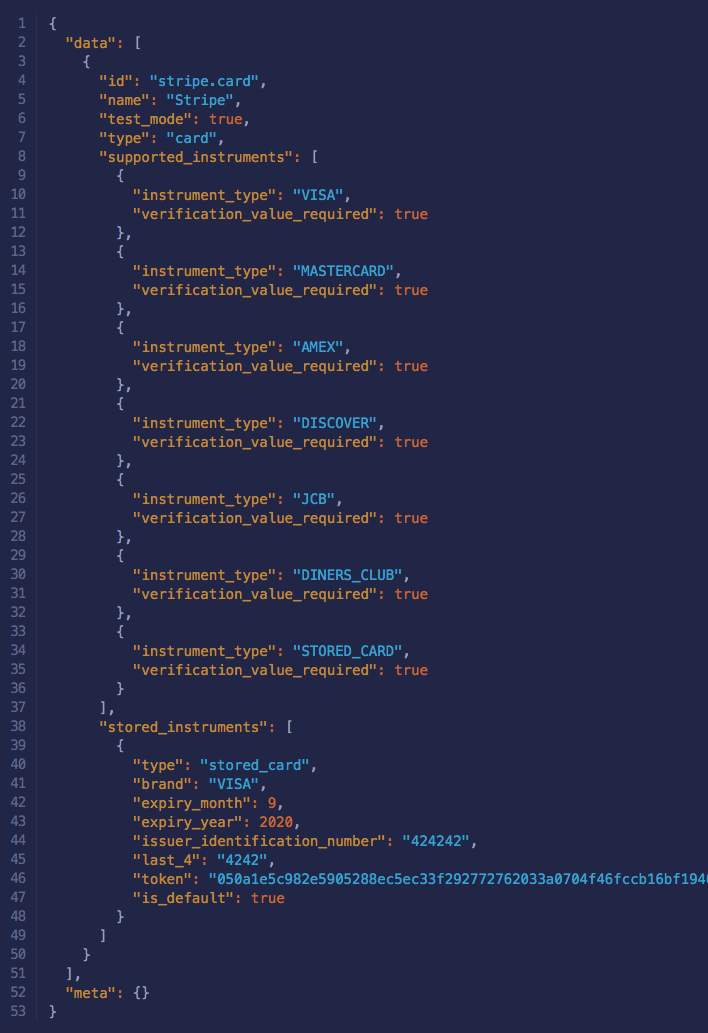
Make note of the ID of the payment method to use in the payment processing request. For a stored instrument, also make note of the token.
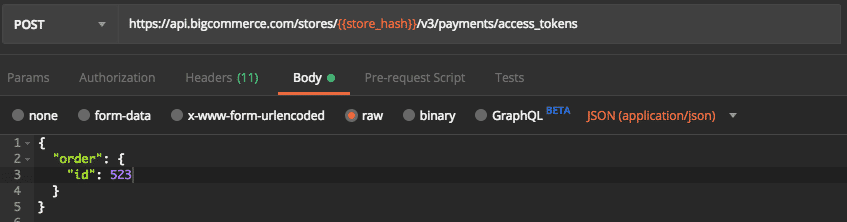
Create Access Token
This endpoint provides the capability to create a payment access token. The payment access token is required when making request to Payments API for submitting payment for an order.
Required Fields
order_id: identifier for the orderis_recurring: whether this is a recurring order. If the order is recurring this field should be set to true in order to let the payment gateway know.

Process a Payment
- Depending on merchant’s configuration in BigCommerce’s Control Panel, the payment request will be processed as either ‘Authorize only’ or ‘Authorize and Capture’
- Payments can be processed using Stored Cards, Payment Tokens or Credit Cards. See Payments API Overview for more
- The “test credit card payments” option in your store payment settings cannot be used for processing payment via the API. A configured payment gateway is required, although this can be a sandbox/test configuration
The headers to process a payment are different than the headers you normally send with a BigCommerce API.
Headers
- Content-Type: application/json
- Accept: application/vnd.bc.v1+json
- Authorization: PAT
{your-access-token}
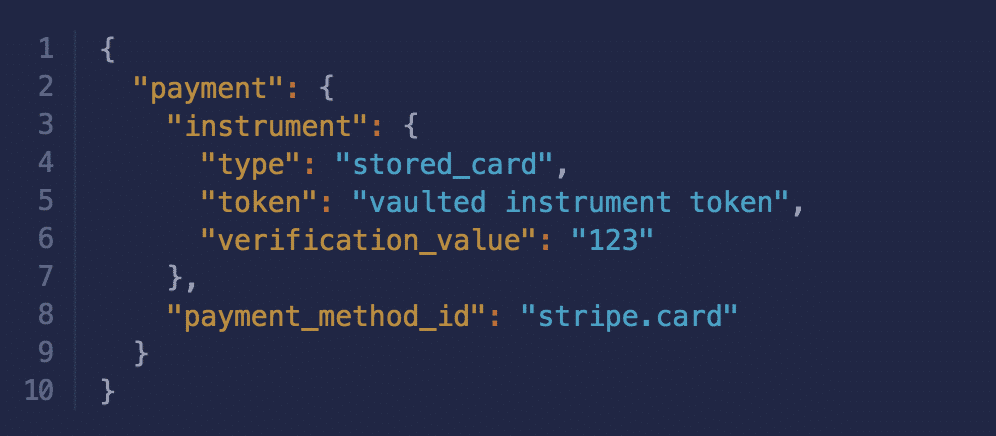
Stored Card
type= Type to classify this payment instrument (ex.stored_card, orcard)token= Identifier representing this stored cardverfication_value= Verification value of this card (CVV)payment_method_id= Identifier for payment method that will be used for this payment and id from the Get Accepted Payment Methods API
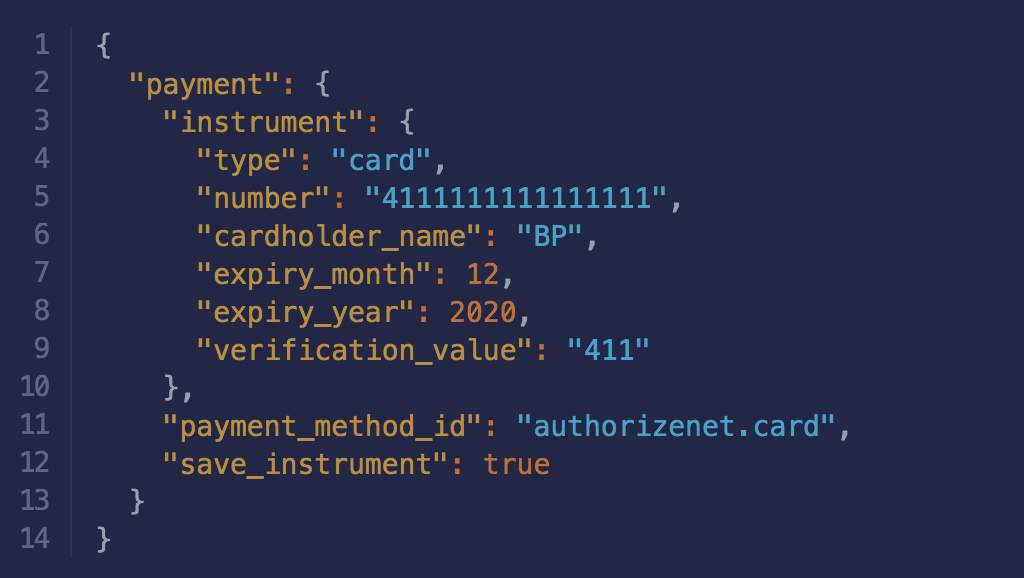
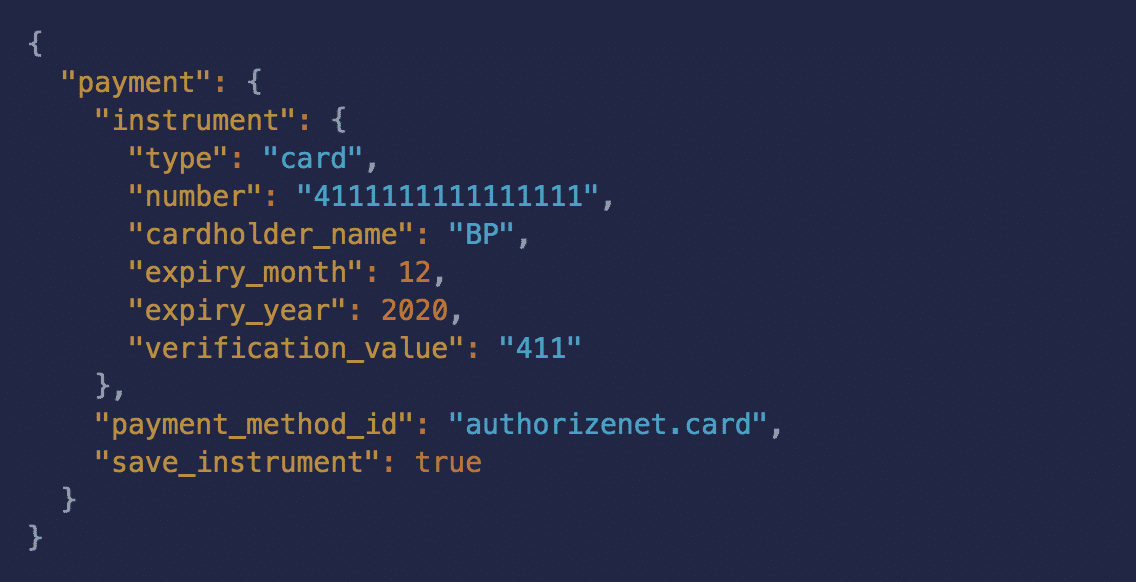
Credit Card
type– Will always becardpayment_method_id– The name of the card in the formatpayment-provider.cardnumbercardholder_nameexpiry_monthexpiry_yearverification_valuesave_instrument- store a credit card while processing a credit card payment
Storing Credit Cards
Payments API allows developers to store a credit card while processing a credit card payment.
When processing a credit payment set save_instrument: true