Lab - Custom GraphQL and Basic Components
With your Catalyst environment now in place and FAQ metafields prepared on one of your store’s products, you’re ready to start building. In this section, you’ll add a rudimentary representation of a product’s FAQs on the product detail page.
In this lab, you will:
- Build a custom GraphQL query using Catalyst patterns and observe the resulting code generation
- Utilize basic components to present FAQs on the product detail page
Setup
Make sure your the local dev server is running in your custom Catalyst project by using the following command in the root directory:
All of the following steps for this exercise will involve working with the code files directly in the Catalyst project.
Remember!
These exercises will proceed from the project you previously set up from the lab repository, which already contains boilerplate code these steps rely on. Revisit the initial setup lab in this course if necessary to get your project set up.
Exercise Reference Copy
If it’s helpful to compare your own code as you go, you can clone or download the completed version of this lab as a reference.
Step 1: Create the ProductFaqs Component
Remember that all file paths given here are relative to the core directory in the root of the Catalyst project.
- Open the file
messages/en.json, which contains locale-specific strings. Locate the top-level “Product” object and add a “FAQ” section to it as shown below.
This use of the messages directory, combined with getTranslations in the following steps, is an example of localizing static text in Catalyst. We’ll explore more details in Internationalization.
- Open the file
components/custom/product-faqs/index.tsx. This defines the component that controls the main presentation of the Product FAQs section. - Modify the props interface and destructuring expression to include
productIdandheadingprops.
- Modify the component to simply output a heading and simple placeholder text for now.
- Open the file
app/[locale]/(default)/product/[slug]/page.tsx. This is the route file for the product detail page, where the final FAQs content will be included. - Add the following import with other imports at the top of the file.
- Find the
returnof the JSX from theProductcomponent. Immediately before thereturn, add the following to retrieve the translated heading string.
- In the JSX returned from the
Productcomponent, find the section with the output ofFeaturedProductsCarouseland add the FAQ code as shown below, betweenFeaturedProductsCarouseland the preceding components.
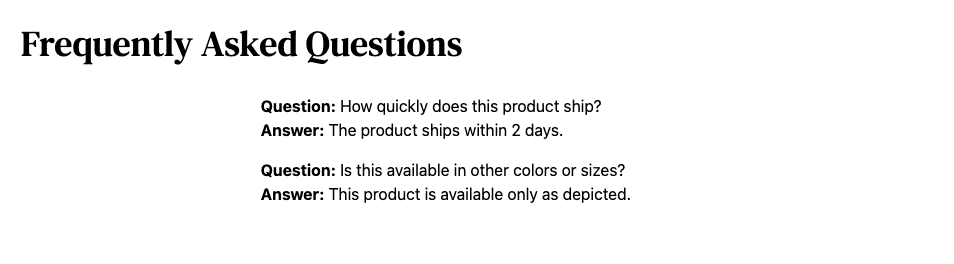
With your component now being included in the page, revisit your product page. You should successfully see the “Frequently Asked Questions” section, albeit with simple placeholder text.
Whenever you’re browsing a localhost site for the first time on a new project, like we’re doing here, you may find that you need to clear all previously existing cookies for this domain in your browser dev tools to avoid unexpected behavior.
Step 2: Create the FAQ Metafields Query
- Open the file
components/custom/product-faqs/_data/component-data.ts. Since the FAQs query will be used both in the server component and eventually a server action, it will be defined here — located closely to the component code but in a centralized place.
Note the import of the zod library. This schema validation library will help with verifying the type/shape of data in cases not specifically related to GraphQL schema, which will be required in this situation when the JSON string of each metafield is parsed.
Also note the formatFaqsCollection function. This will eventually be used to format a custom-tailored response object containing all the information needed by the components, including an end cursor if there are multiple pages of results.
- Modify the code as shown below to fill in the details of the
site.productquery tailored specifically to fetch metafield information. This specifically queries the “FAQ” namespace you used for your previously created metafields.
The MetafieldQuery will be used for fetching the FAQ data, and separating the specific fields into a fragment will assist with TypeScript definitions as we pass the data around.
- Add the following code immediately before the
formatFaqsfunction to define the shape of each FAQ once its JSON is parsed.
- Modify the
formatFaqsfunction as follows. This will standardize the process of transforming the metafield data retrieved with GraphQL into a useful format.
The metafields data expected in the response is a cursor list, requiring the edges and node fields in the overall graph structure. The above code uses the common utility function removeEdgesAndNodes to flatten this data, removing those intermediary layers and resulting in a more typical array of the metafields.
This final logic before data is returned decodes the JSON value of each metafield, adds in the key, then uses the type object you previously created to validate the result. Every object should now include a key, question and answer, and any metafield that doesn’t will not be included in the returned result.
- Modify the
getProductFaqMetafieldsfunction as follows to perform the query.
Note that the getProductFaqMetafields function expects a locale argument, while the GraphQL query expects a namespace. The code above extracts the passed locale and concatenates it into a namespace value in the form “FAQ|locale”.
Next, you’ll update the ProductFaqs component to accept the appropriate data.
- Open the file
components/custom/product-faqs/index.tsx. Add theFaqsCollectioninterface and modify the props interface to receive alimitandfaqsCollection.
- Add a simple
console.logwithin the component to log the FAQs data to the terminal output.
- Open the file
app/[locale]/(default)/product/[slug]/page.tsxand add an import for the data fetch method.
- Before the JSX return, where you previously added
getTranslations, set a record limit and add the fetch of the FAQs data.
- Add the
limitandfaqsCollectionprops to the rendering ofProductFaqs.
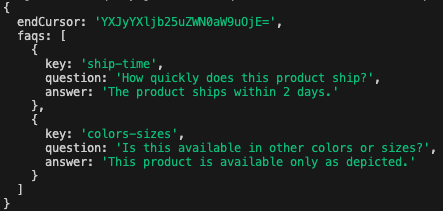
Browse to a product for which you’ve assigned FAQ metafields. The placeholder content will not have changed, but in the output of the terminal where you’re running the dev server, you should be able to observe a log not only of the getProductFaqMetafields query call, but also the data returned from it. (Note that the limit passed into the query function means you’ll only see two results.)
Step 3: Create the Listing Component
-
Open the file
components/custom/product-faqs/faqs-list.tsx. This defines the component that will render just the FAQs list, which will be reused in a couple of places. -
Modify the component to accept a list of FAQs and render a simple list.
- Open
components/custom/product-faqs/index.tsxand remove the logging statement you previously put in place.
- Replace the previous placeholder text with the
ProductFaqsComponentclient component.
In our final state, the page route does the job of fetching the FAQs data and hands it off to ProductFaqs. This component sets up the main UX (which we’ll add to later) and in turn passes the FAQs to FaqsList to render the list.
Revisit your product page. You should successfully see the first two FAQs displayed. This is a rudimentary presentation for now, but you’ll soon spruce it up.