Common Conventions
Introduction
There are a few concepts and techniques that are broadly applicable to the B2B GraphQL API and to the examples included in this course. In this section, we’ll explore these common conventions.
GraphQL Variables
Many GraphQL mutations and queries accept arguments, such as the storeHash, email, and password arguments of the login mutation.
The values for such arguments are often user-provided input. While argument values can be interpolated directly in the query as shown above, it’s often a better practice to utilize GraphQL variables.
Below is an example of the same mutation, but with the query syntax accepting and using variables of the appropriate types:
When using variables in this way, provide a variables dictionary in the JSON request body, alongside the query string itself. variables should itself be a JSON object of key/value pairs:
Most API clients, such as Postman, support a dedicated UI for entering both the GraphQL query and the variables JSON.
All examples in this course will utilize GraphQL variables for arguments.
Cursor Lists and Pagination
All queries that return a list of items utilize the same Cursor Connections pattern, linking each item to the next in the list, providing information about whether further results are available, and exposing filtering arguments for pagination.
Observe this simple example of a query for a list of items (company users in this case):
- The
edgesfield contains the actual list of items, each of which has a uniquecursor. - The
pageInfofield contains metadata about the list, including whether there are other results available before or after the cursors represented in the current result set (hasNextPageandhasPreviousPage), as well as the starting and ending cursors from the current result set (startCursorandendCursor). totalCountreports the total number of available results, regardless of how many the current result set includes.- In addition to
cursor, each item in the results contains anode, which is an object of the unique GraphQL type returned by this particular query/field (UserTypein this case). - The
firstargument provided tousersindicates the number of results that should be fetched in this set (10 in this case).
Paginating Results
Next or previous “pages” of results can be queried by using standard filter arguments along with the cursor values.
Given the example query above, say that the results included a hasNextPage value of TRUE and an endCursor value of “abc123”. The next set of results can be fetched using the after argument.
Example Request:
Example Variables:
This combination of first and after effectively translates to “give me the first 10 results after cursor ‘abc123’.”
In the same way, hasPreviousPage will report if there are results before the current set, and the value of startCursor can then be used with the before argument, in combination with last.
Example Request:
Assuming “abc123” was the first cursor in the current result set, using the query above with that value would translate to “give me the last 10 results before cursor ‘abc123’.”
In addition to the standard first, last, before, and after arguments from the Cursor Connections specification, all cursor lists in the B2B GraphQL API also support the offset argument for a different style of paging.
Example Request:
The above query fetches 10 results offset from the first result by the value of offset. For example, the second page of results would be fetched by passing in an offset of 10 in this case (the first 10 results offset by 10). This pattern also allows for directly fetching the third page of results (offset 20), fourth page of results (offset 30), and so on, without knowing the specific item cursors.
Again, all cursor lists in the B2B GraphQL API utilize these same pagination arguments.
Store Hash and Channel ID
Two values that are required or available in many queries or mutations are your store’s unique “store hash” and the ID of the BigCommerce channel associated with a specific storefront.
Store Hash
Many queries or mutations require a storeHash argument identifying your store. The easiest way to find your unique store hash is in the BigCommerce control panel, where this value is represented in the URL, formatted like https://store-{hash}.mybigcommerce.com/manage/...
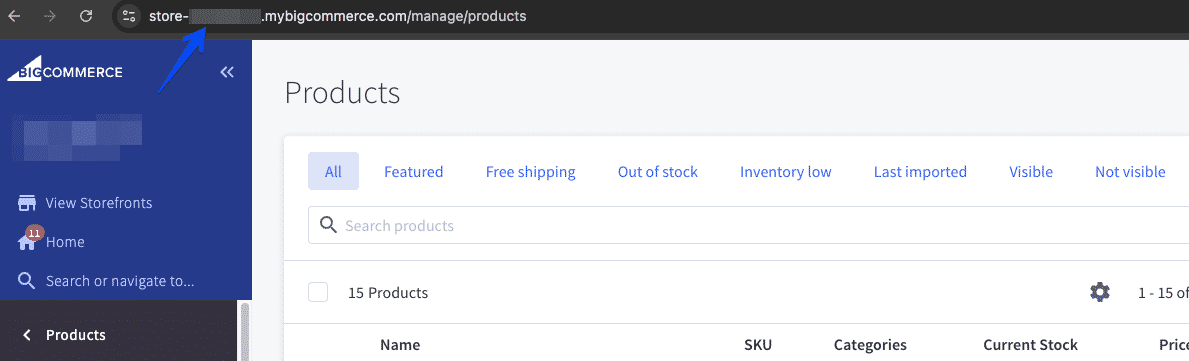
This hash will never change for a particular store, and this value should typically be a static configuration value in your application.
Channel ID
Some queries include a channelId argument that can be used to filter results or a channelId field that can be queried as part of those results.
This value is only relevant when Multi-Storefront is enabled for your store and multiple storefronts have B2B Edition enabled. channelId identifies the specific storefront channel an entity is associated with. For example, when querying quotes, channelId will indicate which storefront channel a quote was created for:
The examples in this course will not specifically focus on multi-storefront scenarios and will not include channelId, but you can review the details of any query or mutation in the GraphQL Playground to determine if channelId is supported.
Extra Data Fields
B2B Edition supports adding custom “Extra Fields” to several types of entities in the control panel, in order to store information unique to a merchant’s own needs and implementation.
The GraphQL API supports querying these extra fields, allowing you to utilize them for whatever purposes make sense in your own implementation.
Example Request:
See the schema/docs in the GraphQL Playground for full details on which types support extraFields.
Some B2B entities also include arbitrary fields directly on the entity (for example, extraInt1) for custom integrations to utilize. While multiple entities support populating these fields using the REST Management API, currently only orders allow them to be queried from the storefront context using GraphQL.

