The JavaScript API
Introduction
As previously discussed, the Buyer Portal’s JavaScript API is available as the window.b2b.utils object. Let’s explore a few more of the utilities available.
User Profile and Token
The user.profile function will return information about the currently logged-in user.
Example Code:
Example Result:
The user.getB2BToken is an essential function that fetches the currently logged-in user’s B2B GraphQL authentication token.
Example Code:
This token can be used to make custom B2B GraphQL API requests from your own code.
Working with Quotes
A set of methods available from window.b2b.utils.quote allows you to manage the current “draft” quote belonging to the logged-in user.
Adding Products to the Quote
The addProducts function will add products to the current draft quote:
Each item must contain a productEntityId and either a specific sku (as seen above) or a variantEntityId.
The addProductFromPage function is also available for the same purpose, accepting only a single product:
Adding from the Cart
You can also use the addProductsFromCart function to add the current contents of the user’s cart to the draft quote:
Getting Quote Details
The getCurrent function is available to retrieve details of the logged-in user’s current draft quote.
Example Code:
Example Result:
Working with Shopping Lists
The window.b2b.utils.shoppingList object is also available for working with shopping lists.
Create a Shopping List
A new shopping list can be created with createNewShoppingList, which returns the details of the new list.
Example Code:
Example Result:
Adding Products
Using the addProductFromPage function will initiate the typical Buyer Portal modal allowing the user to choose a shopping list, then add the specified product details.
Example Code:
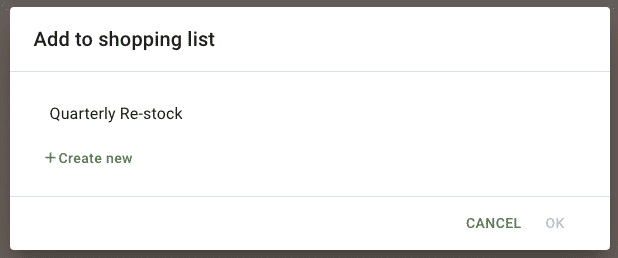
Like the quote functions, the items accepted by addProductFromPage can contain a variantEntityId instead of a sku.
Super Admins and Masquerade
The window.b2b.utils.user object also exposes a couple of functions that are useful when the logged-in user is a Super Admin with privileges to “masquerade” under different companies.
You can initiate a masquerade if you know the ID of a company the logged-in user has permissions for. (This list can be obtained with the superAdminCompanies GraphQL query, using the token obtained from user.getB2BToken.) Use setMasqueradeCompany to start the masquerade:
The Super Admin’s current masquerade session can be ended with endMasquerade:
You can review all available objects and methods in the window.b2b.utils namespace in the Buyer Portal source code, linked below.

