Powered by API Documentation
Introduction
Powered by is a collection of partner-focused APIs that enables you to offer BigCommerce stores to your merchants and seamlessly onboard them to our ecommerce platform. Additionally, you can decide whether you own the billing relationship for your merchant’s BigCommerce products or let BigCommerce manage billing directly with the merchant.
Our public APIs enable you to:
-
build an onboarding experience that is personalized to your own platform
-
create and manage the lifecycle of accounts and stores
-
automatically install apps during store creation making it easy for your merchant to connect their store to your platform
This document provides an overview of the solution, a list of supported API endpoints, and troubleshooting information to assist you with your integration.
Product Overview
Data Objects
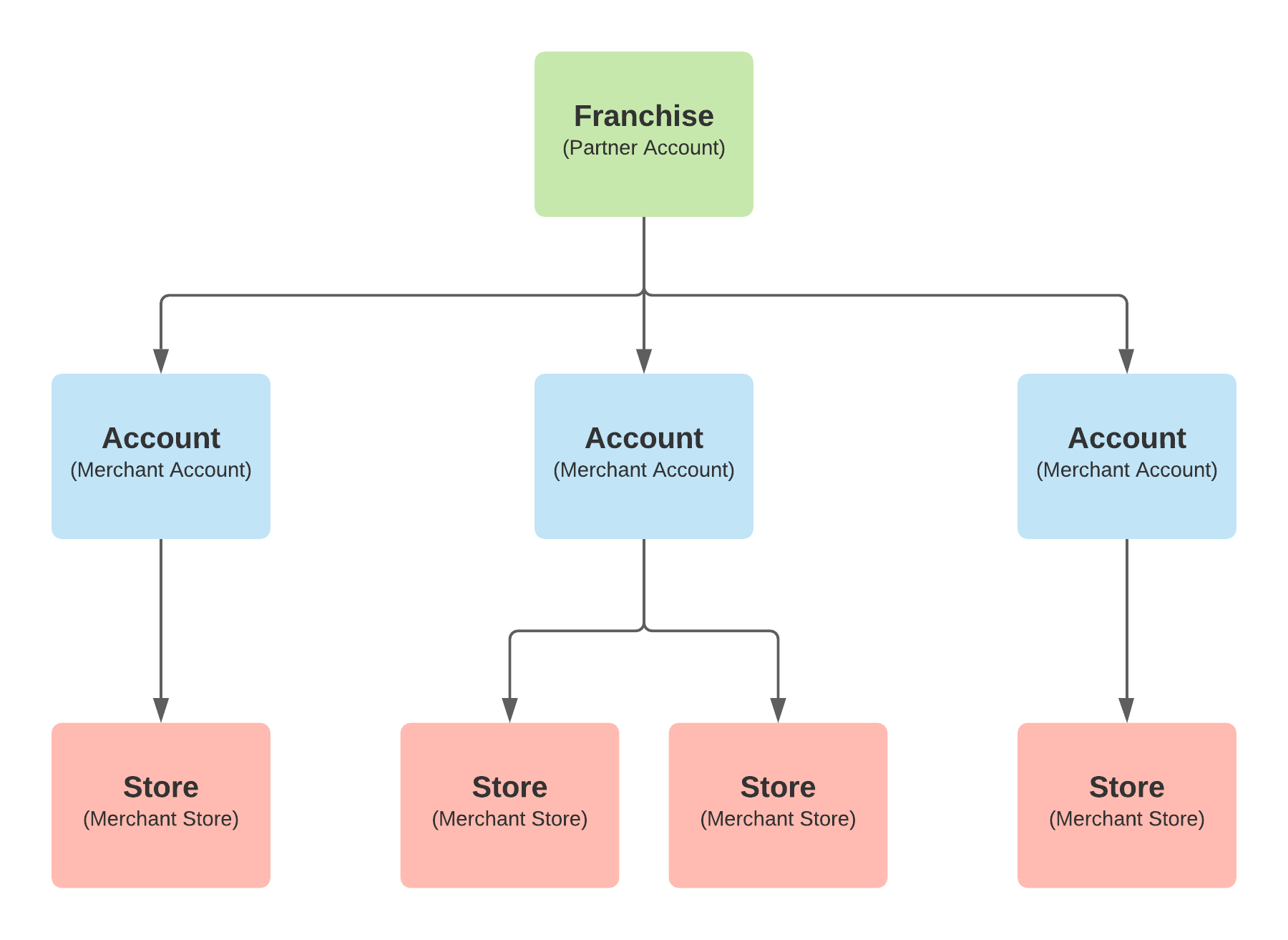
The Powered by solution consists of 3 primary data objects: a franchise, account, and store.
Franchise
The franchise object represents your onboarding account on the BigCommerce platform and is the parent for all accounts created through the API. Your franchise allows you to manage these accounts on behalf of your merchants. This object contains the custom settings for your onboarding flow including:
-
Retail plan SKUs you are allowed to use when creating and upgrading/downgrading stores
-
Billing preferences and contact information
-
Apps to be auto-installed during new store creation
-
Allowed settings that can be passed as fields in the create store request with merchant specific data
Apps
Powered by allows you to install apps automatically when creating a store so the app is ready for the merchant when they log into their store for the first time. This is a global configuration on the franchise that will be applied to all stores created under your franchise. Store specific app selections are not supported.
Auto-installing an app only installs the app on a store so it appears under the My Apps section when the merchant logs in for the first time. Auto-installation does not configure the app or connect it to your platform. If auto-configuration is required, additional scoping is needed to determine if BigCommerce can support the requirements.
App Submission
Eligible apps must be submitted through the Developer Portal and approved. They must also be configured as a single-click app to support the auto-installation process. This configuration is performed by BigCommerce following app submission and approval.
In order to test app auto-installation in test environments, a copy of your app must be submitted through the Developer Portal for each environment. Here’s how:
-
Create a new trial store in each of our test environments. You can do this by going to:
-
Once you created a store in each environment, log into our Developer Portal for the environment you need to test in using the login credentials you created for trial store in the same environment. You can access the dev portal by going to:
-
Once you are logged in to the applicable Developer Portal environment, follow the same process you do in production to submit your app. When submitting, use the Partner ID you use in production. Please make sure that each app points to the correct endpoint URLs for the environment:
- Integration:
api.integration.zone - Staging:
api.staging.zone
- Integration:
-
When asked to submit payment - use the following test payment method:
- Credit Card Number: 4111-1111-1111-1111
card" showLineNumbers={false}
- Expiration Date: any
MM/YYYYin the futureexpiration date" showLineNumbers={false} - CVV: any 3-digit code
CVV/CVC" showLineNumbers={false}
- Credit Card Number: 4111-1111-1111-1111
-
Once you have submitted your app in each environment, please confirm with the team so we can complete the final steps internally.
Account
The account object represents your merchant’s account with BigCommerce and is the parent for all BigCommerce products and services that belong to a merchant. The account contains information about the merchant including:
-
External reference ID to the merchant in your system
-
Company name
-
Primary & billing contact information
-
Payment method information
Store
The store object represents your merchant’s store with BigCommerce and is a child of the merchant’s account. The store contains the following information:
-
External reference ID to the merchant’s store in your system
-
Store name
-
Store status
-
Domain name
-
Store plan SKU and pricing
The diagram below shows the relationship between these objects.
Store Lifecycle
The diagram below depicts the standard workflow states and lifecycle of a BigCommerce store.
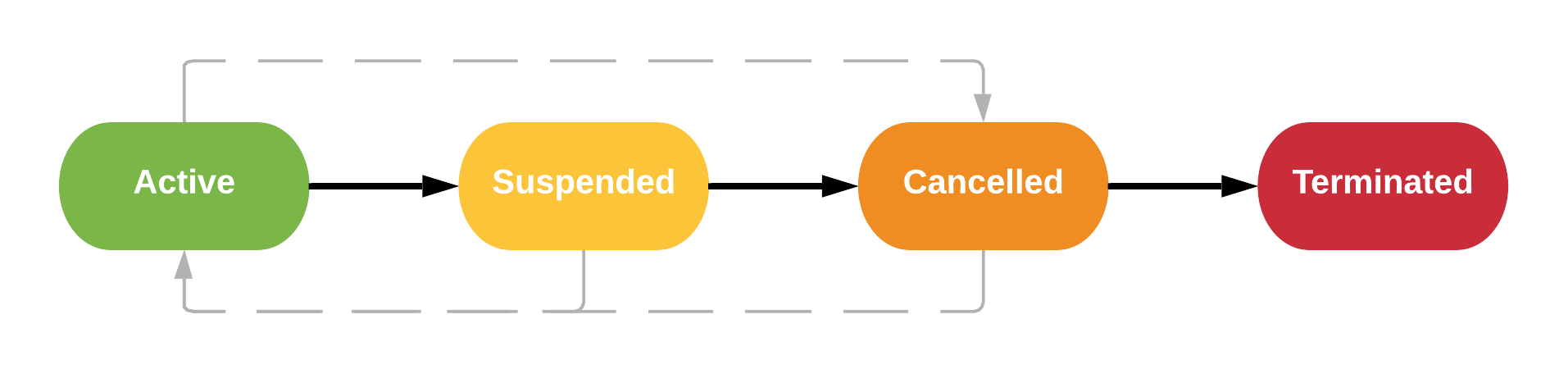
Active
Billing for the store is active. The merchant has full access to their store control panel and account area. The merchant controls the ability for shoppers to access their store.
Suspended
Billing for the store is suspended. The merchant is restricted from accessing their store control panel but can still access their account area. Shoppers are not able to access the merchant’s store. Billing is suspended.
Suspended stores can be reactivated to Active.
Cancelled
Billing for the store is suspended. The merchant has no access to their store control panel and account area. Shoppers are not able to access the merchant’s store.
Cancelled stores can be restored to Active.
Terminated
Billing for the store is cancelled. The merchant has no access to their store control panel and account area. Shoppers are not able to access the merchant’s store.
When a store is terminated, all store data is deleted from the platform and no further action can be taken on the store.
Merchant Onboarding
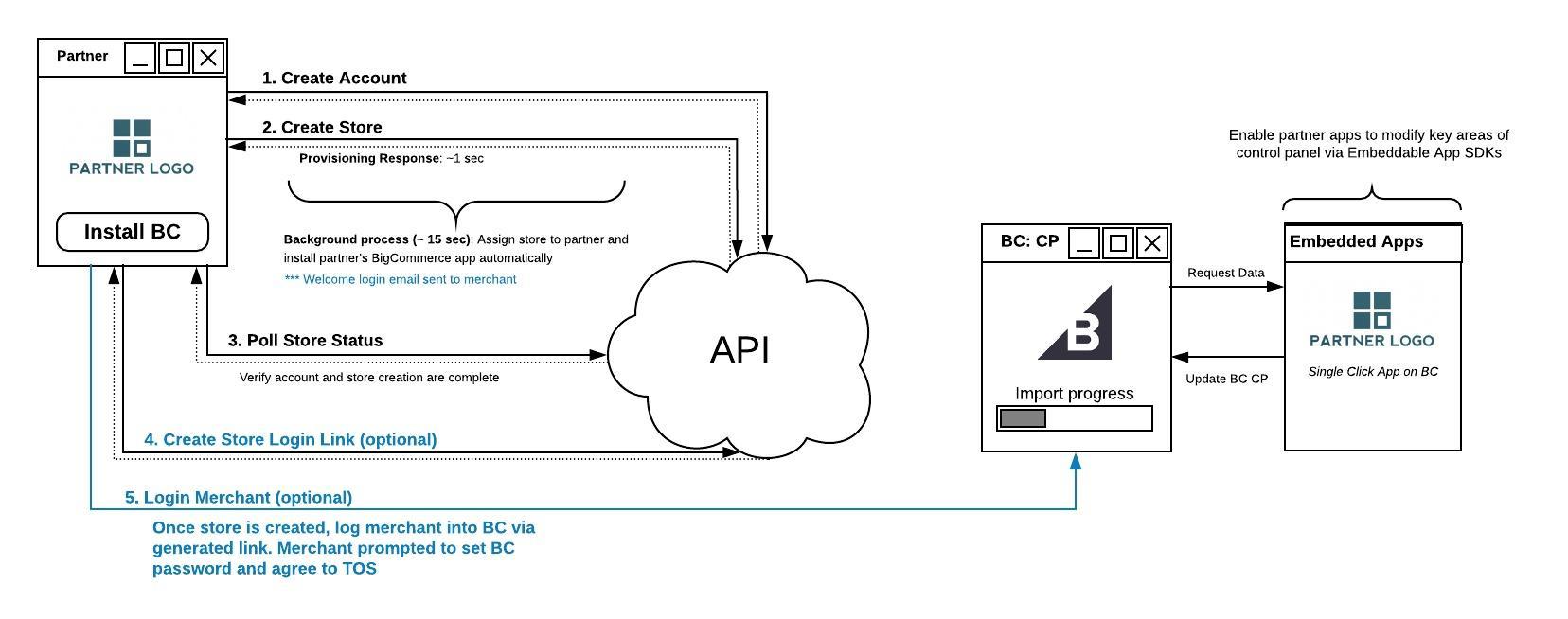
The steps below outline the recommended merchant onboarding flow to the BigCommerce platform:
-
Merchant initiates a request for a BigCommerce store from the partner’s platform
-
Create Account request is sent with merchant info to create the merchant’s account. Successful account creation will initiate an email to the merchant requesting them to confirm their account and create a password.
-
Create Store request is sent with store and configuration data to create the merchant’s store.
-
If your franchise has been configured to include the auto-installation of an app, the app will be installed during this step as outlined in BigCommerce’s standard single-click app installation process.
-
To check the provisioning status of the store, you can poll the Get Store endpoint using the external reference ID for the store. The provisioning process typically completes in ~15 seconds.
-
-
Once the Get Store request returns a 200 response, the store is ready for the merchant.
-
There are two methods to direct the merchant to their newly created BigCommerce store:
-
Provide a confirmation message to the merchant advising them to check their inbox for the account confirmation email sent during account creation.
-
Log the merchant directly into their BigCommerce store using the Create Store Login URL endpoint.
-
Store Lifecycle Management
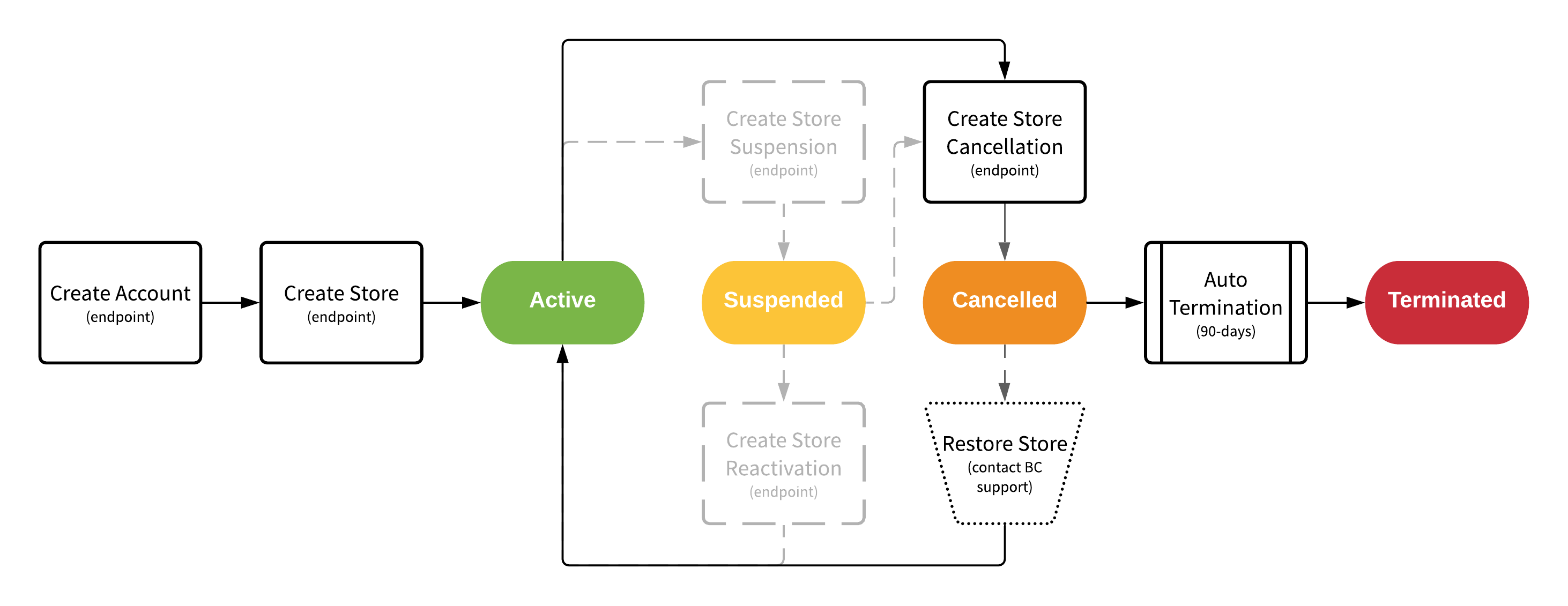
Delegated billing partners are responsible for managing the lifecycle of the stores under their franchise in order to act on cancellations and unpaid invoices. The diagram below shows how stores are managed from creation to termination using the Powered by APIs.
Suspensions
Store suspension requests are processed on the last day of a store’s billing cycle and the merchant can continue to access their store until this day. When a store is moved into suspended status, it remains under your franchise indefinitely until further action is taken. While billing is suspended, it will continue to appear on the Store Activity billing report as a $0 item. It is your responsibility to transition these stores to cancelled status.
While BigCommerce supports the ability for partners to suspend and reactivate stores, we do not recommend these activities. You can reduce integration complexity by excluding these endpoints from your integration unless this workflow state is required for your solution. This also eliminates the need for you to manage store transitions from suspended to cancelled status.
Cancellations
Store cancellation requests are processed on the last day of a store’s billing cycle and the merchant can continue to access their store until this day. Once a store is moved to cancelled status, it will remain under the franchise for 90 days. Billing remains suspended and the store is moved to the Cancellation Activity report. During this time, the partner has the ability to restore the store to active status and resume billing. If no action is taken, the store will automatically be terminated after the 90 days with no further action required by the partner.
Manual Upgrades
In addition to managing the workflow states above, partners also have the ability to manually upgrade or downgrade a merchant’s store subscription based on their needs.
While stores are automatically upgraded by BigCommerce based on sales volume, partners can initiate an upgrade if a merchant requires additional features that are only available on higher plans.
Alternatively, partners can also downgrade a merchant’s stores; however, if the merchant’s sales volume is above the threshold for the plan they are downgraded to, they will automatically be upgraded to the appropriate plan based on their current sales volume in the next billing cycle.
Billing
Powered by gives you the flexibility to choose how you manage billing for the merchants you onboard to BigCommerce.
Non-Delegated Billing
As a non-delegated billing partner, BigCommerce maintains a direct billing relationship with the merchant for the products and services purchased on the platform. This option allows you to onboard your merchants to a trial store and requires the merchant to upgrade to a paid subscription in the account area of their store.
Following trial creation, there is no further action required by the partner to manage the merchant’s BigCommerce account and store.
This option is similar to a traditional referral flow model and is recommended for partners who are interested in building an onboarding experience that is tailored to their platform experience and/or require auto-app installations during store provisioning.
Delegated Billing
As a delegated billing partner, you own the direct billing relationship with your merchant for the core products in the BigCommerce platform. This option allows you to onboarded merchants directly to one of our paid retail plans - Standard, Plus, or Pro.
Following store creation, partners are required to manage the lifecycle of the stores under their franchise. This includes suspensions, cancellations, and manual store subscription upgrades. Excluding violations to our Terms of Service, BigCommerce takes no action to suspend or cancel these stores that belong to a delegated billing franchise. All stores will remain in active status until changes are initiated by you. See Store Lifecycle Management.
Products Billed to the Partner
BigCommerce will bill you for all store subscriptions under your franchise and any core products purchased by your merchants on the BigCommerce platform. These core products include:
-
Domains
-
SSLs
-
Insights
Products Billed to the Merchant
For all other products sold outside of the core offering above, merchants are required to add a payment method to their account before they can make purchases. BigCommerce manages the billing relationship for these products directly with the merchant. These products include:
-
Themes
-
Google Workspace
-
BigCommerce Services
Billing for these products has no impact on the core products billed directly to you.
Invoicing
Auto-Upgrade Calculations
On the 1st day of each month, BigCommerce calculates the sales volumes for all stores under your franchise and schedules automatic upgrades for the stores that have surpassed the sales volume threshold for their plan.
Invoice Generation
On your bill cycle day, BigCommerce generates an invoice (.pdf) for the charges under your franchise and delivers it to you via email. Charges are billed in arrears and will reflect the activity from the previous month.
Detailed Billing Report Generation
On the day after your bill cycle day, BigCommerce generates a collection of detailed billing reports (.csv) for the charges under your franchise and delivers it to you via email. These reports provide your invoice data in a consumable format to support your reconciliation. The collection includes 3 reports:
-
Store Activity Report This report provides a listing of all active and suspended store subscriptions under your franchise. It includes supplemental information about each store and provides visibility to stores that will be auto-upgraded or cancelled at the beginning of the next billing cycle.
-
Services Activity Report This report provides a listing of all additional products purchased by the merchants under your franchise and includes supplemental information about each service.
-
Cancellations Activity Report This report provides a list of all stores currently in cancelled status under your franchise. It also provides you with the scheduled termination date for a cancelled store. You can use this report to determine if a cancelled store is still eligible to be restored to Active status for the merchant.
Getting Started
In order to access the Powered by API, a franchise needs to be created for you in our development and production environments. Once the franchise has been created, you will be provided with credentials for each environment. Credentials are delivered securely through Keybase which supports end-to-end encryption. You will need to create a Keybase account to receive your credentials if you don’t have one.
We need the following information for your primary contact to create your franchise:
-
Company name
-
First name
-
Last name
-
Email address
-
Phone number
-
Address
-
Keybase username
If you plan to implement Powered by as a delegated billing partner, we also need the information below:
Bill cycle day
This determines which day of the month BigCommerce will invoice you for products under your franchise. We recommend that delegated billing partners are billed on the first day of the month.
Store subscription alignment preference
Aligned
Merchant store subscriptions are aligned to your bill cycle day. This means that if your bill cycle day is the 1st of the month, and you create a store for a merchant on the 15th of the month, the first month of their subscription will appear on your next invoice as a prorated charge for the 15 days remaining in your bill cycle. Future months will be aligned to your bill cycle.
Unaligned
Merchant store subscriptions are aligned to the start date of the subscription. This means that if your bill cycle is the 1st of the month and you create a store for a merchant on the 15th of the month, their subscription will appear on your next invoice for the full amount of the subscription.
API Base Paths
The base path for accessing the Powered by APIs in each environment can be found below.

