Company Management
NOTICE
As of September 30, 2025, the B2B Edition API
authTokenwill be deprecated and replaced by the standard BigCommerce APIX-Auth-Token. For information concerning this change, see B2B Authentication.While
authTokenauthentication is not expected to be fully sunset in the near future, it is advised to migrate to the new system as soon as possible to prevent disruption of functionality.
Introduction
A Company in B2B Edition is the business account for B2B clients, which connects buyers in the business within its instance of the Buyer Portal.
BigCommerce customer groups determine the products and pricing that a Company’s buyers see. Assign Company accounts to these groups as needed. Multiple Companies may share the same customer group, or remain unassigned to access the default catalog and pricing. The customerGroupId field maps Companies to customer groups.
NOTE: If your store uses legacy Dependent Companies behavior, each Company account has a one-to-one relationship with a BigCommerce customer group. Once created, you cannot reassign the Company to another customer group; you can only delete it. See Companies and Customer Groups in B2B Edition (Help Center) to learn more about how Independent and Dependent Company behaviors work.
Available Resources
Company Status Codes
The companyStatus object indicates the activity status of a particular Company account in the response body of the following endpoints:
- Get All Companies (can also be used as a parameter in the query)
- Get Company Details
- Update a Company’s Status
This is expressed as a string or integer, with numeric values that correspond to a possible status. See the table below for more information:
Company Account Hierarchy
Account Hierarchy functionality establishes parent-child relationships between multiple Company accounts belonging to a single client business. Buyers assigned to Companies on higher layers can access the Buyer Portal for their subsidiaries. This functionality allows you to support clients with complex businesses, such as chain stores, franchises, and global corporations.
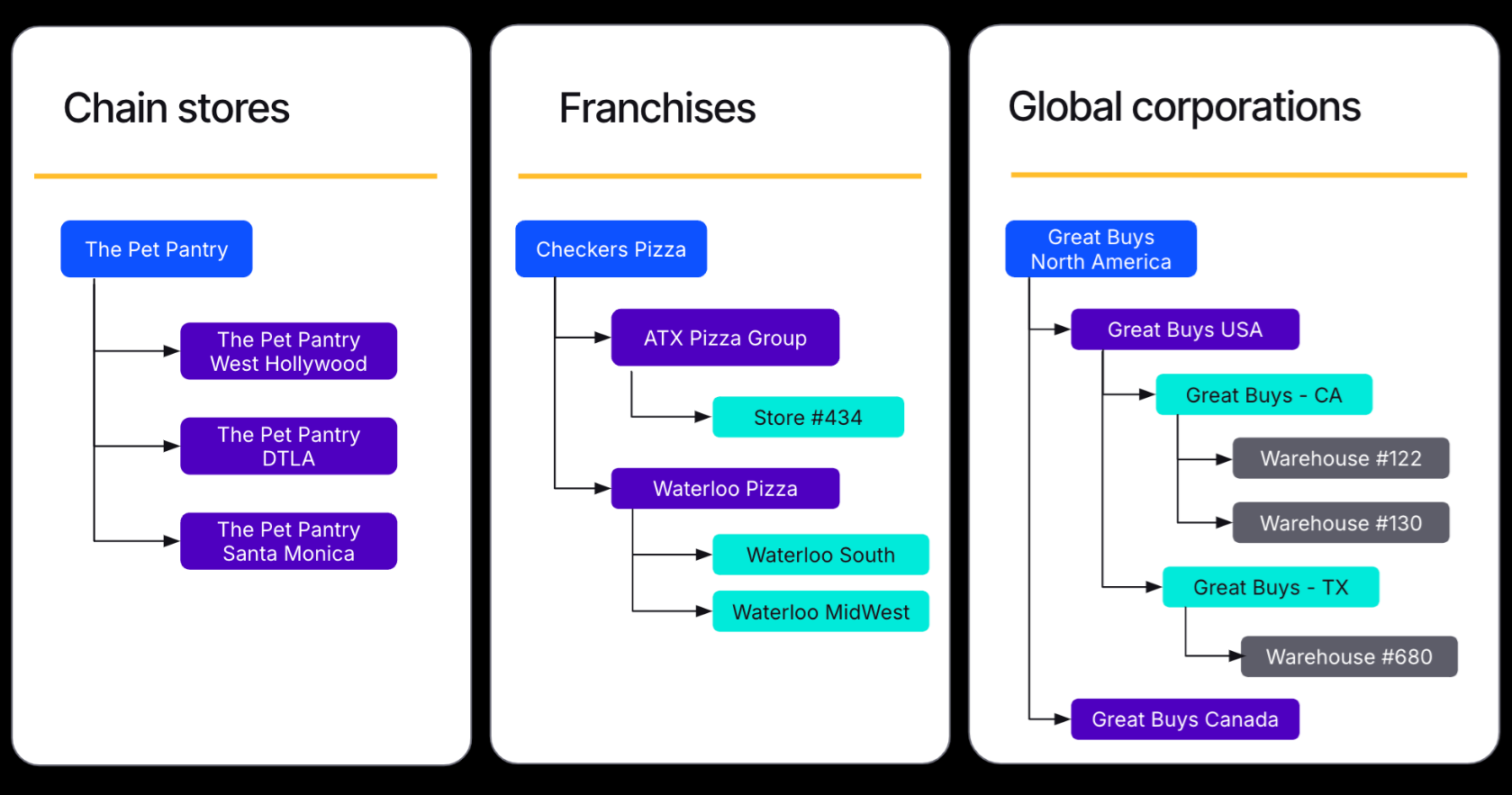
NOTE: This functionality comes enabled by default on all new B2B Edition stores. It is also available upon request for existing stores using the Buyer Portal experience and Independent Companies behavior. You can request Account Hierarchy by contacting our support team.
Account Hierarchy adds support for the following endpoints:
- Get Company Subsidiaries — View all accounts in lower layers of Account Hierarchy compared to a particular Company account.
- Delete Company Subsidiary — Removes the parent-child relationship between a specified subsidiary account and its parent Company.
- Attach a Company as the Parent of a Current Company — Assigns one Company account to the hierarchy layer directly above another Company.
- Get Company Hierarchy — View all accounts in the same hierarchical structure as a particular Company.
You can create up to 5 layers of hierarchy for a given organization, and each hierarchy can have a maximum of 500 Companies assigned to it.
Company Roles and Permissions
Buyers in a Company account, or Company users, are assigned a role that determines what they can view and configure within the Buyer Portal. B2B Edition includes predefined Company user roles, but you can also create custom roles with a unique set of permissions.
Additionally, you can use the Company Roles and Permissions API to create custom permissions for more complex role-based access control. Note that custom permissions are not configurable from the B2B Edition control panel.
Permission Codes
When creating or updating Company user roles, you must specify the permissions that are enabled for the role and their scopes. The code field accepts the following default permission code strings, but you can also add the code value for custom permissions.

