Lab - Complex Rules
Lesson 16 of 21 · 30 min
This lab activity will give you a chance to practice working with complex rules via the Catalog API. Each step will walk you through how to use all of the endpoints covered in the previous lesson.
Prerequisites:
- BigCommerce store (sandbox or live)
- Basic knowledge of APIs
- REST client (Postman)
- Completion of previous Catalog API labs
In this lab, you will:
- Create a second modifier option
- GET modifier options
- Create a complex rule
- GET complex rules
Create a Second Modifier Option
- Copy and paste the request below into Postman
- Enter the ID of the product created in previous lab for
product_idin the Params tab - Copy and paste the code below into the Body section of Postman
- Select POST next to the request url
- Click the Send button
- Observe response and modifier option added to product
Get Modifier Options
- Copy and paste the request below into Postman
- Enter the ID of the product created in previous lab for
product_idin the Params tab - Select GET next to the request url (if not already selected)
- Click the Send button
- Observe response
- Copy
modifier_ids andmodifier_value_ids for next steps
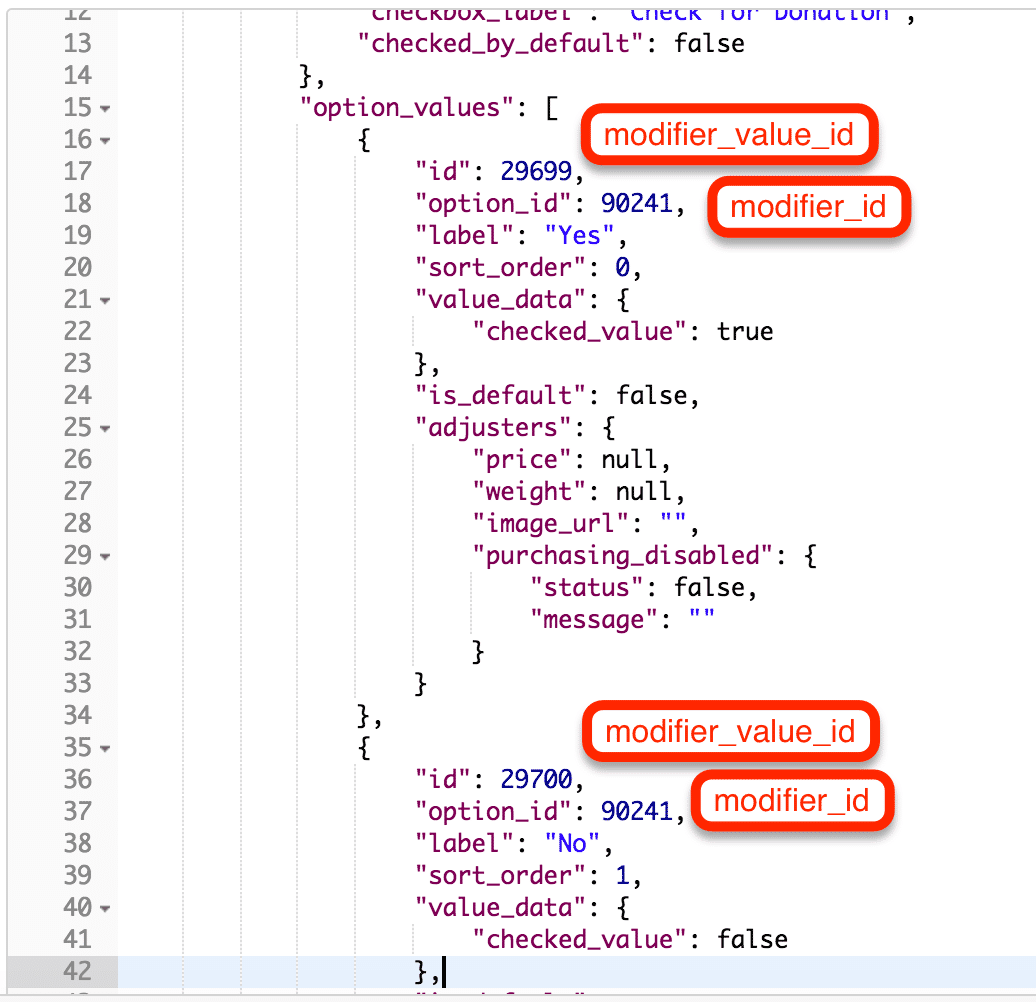
Create a Complex Rule
- Copy and paste the request below into Postman
- Enter the ID of the product created in previous lab for
product_idin the Params tab - Copy and paste the code below into the Body section of Postman
- Replace
{modifier_id}with the IDs of the checkbox modifier options:donation_checkedandsticker_checkedrespectively - Replace
{modifier_value_id}with the ID of thecheckedmodifier value to0and1respectively - Select POST next to the request url
- Click the Send button
- Observe response and complex rule functioning on the product
GET Complex Rules
- Copy and paste the request below into Postman
- Enter the ID of the product created in previous lab for
product_idin the Params tab - Select GET next to the request url
- Click the Send button
- Observe response

